AI RAM Requirements 2026: How Much for 7B, 13B, 70B Models?
Want to go deeper than this article?
Free account unlocks the first chapter of all 25 courses — RAG, agents, MCP, voice AI, MLOps, real GitHub repos.
Got the hardware sorted? Now build on it. You know what to buy — the courses show you what to actually run, fine-tune, and ship on it. First chapter free, no card.
Published on October 28, 2025 • Updated November 2, 2026 • 20 min read
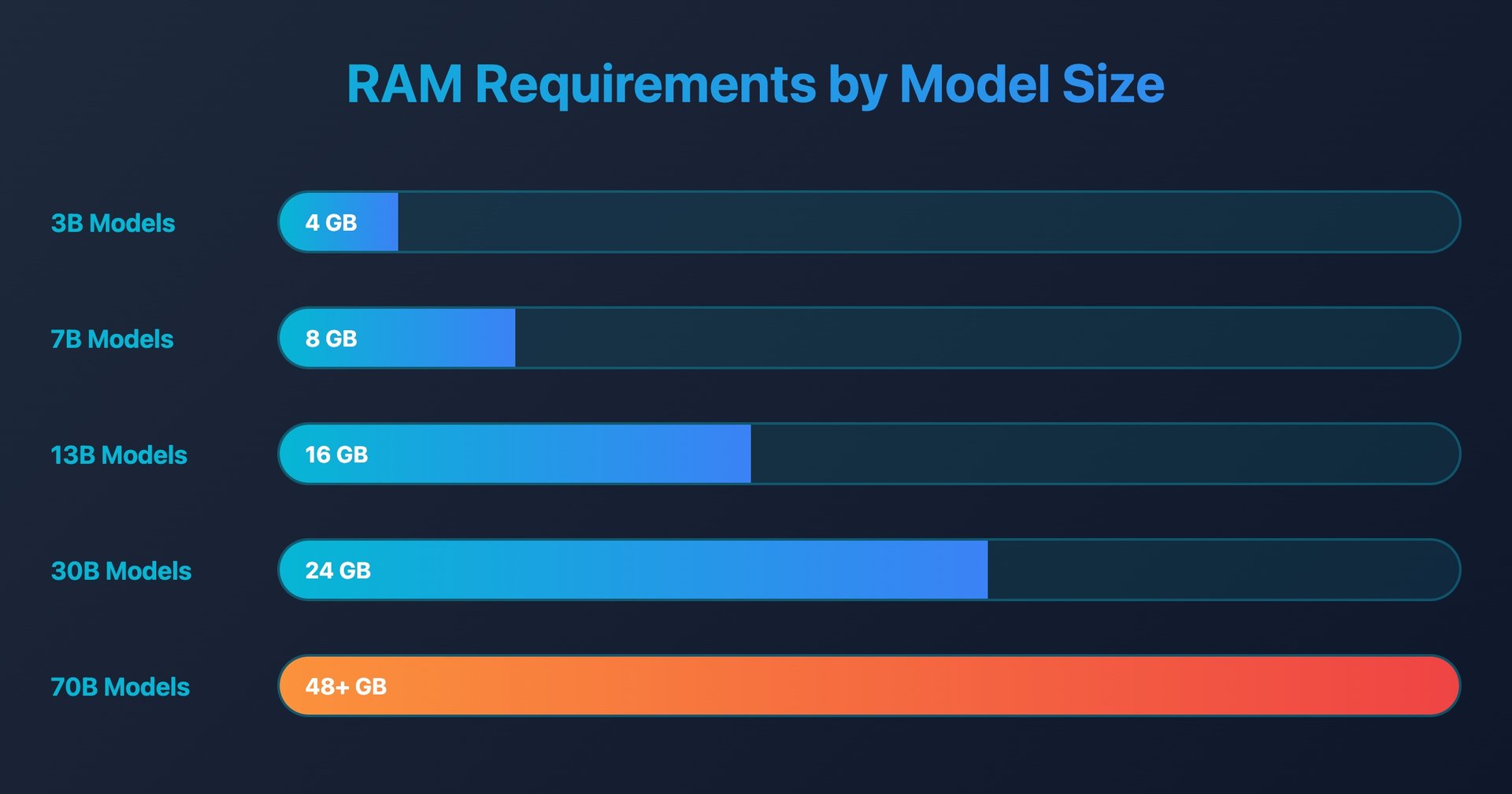
Short answer: for local AI you need 8GB RAM to run 7B models (Llama 3.1 8B, Mistral 7B), 16GB for 13B models, 32GB for 30B+ models, and 64GB+ for 70B models — roughly 1–2GB of RAM per billion parameters at 4-bit quantization. This guide breaks down exact memory needs per model size, how quantization cuts those numbers, and when a RAM upgrade is worth it.
💡 Quick Answer
You can run 7B models comfortably with 16 GB RAM, but 30B+ models demand 64 GB or more for smooth inference.
⚠️ 2026 RAM/DRAM price spike — check live prices before you buy
AI data-center demand has sent memory prices soaring in 2026. TrendForce reports conventional DRAM contract prices jumped roughly 90–98% quarter-over-quarter in Q1 2026 — the largest on record — and consumer DDR5 kit prices have risen sharply (many kits have roughly doubled or more since 2025). DRAM bit-supply is growing only ~10–15% a year, far slower than AI demand, so prices are elevated and volatile and analysts expect them to stay high through 2026. The kit prices in the cost section were re-read on November 2, 2026 (32GB DDR5-6000 kits at $479.99-$509.99 and 64GB kits at $833.63-$1,029.99 at Walmart; Corsair direct $499.99-$559.99 and $989.99). Anything not marked with that date was not re-checked, so price it live before purchasing.
How Much RAM Do You Need for Local AI?
You need 8GB RAM minimum to run small local AI models (up to 7B parameters like Mistral 7B), 16GB RAM for medium models (up to 13B parameters like Llama 2 13B), and 32GB+ RAM for large models (33B+ parameters). Most users achieve excellent results running models like Llama 3.1 8B or Mistral 7B with just 8GB RAM.
RAM Requirements by Model Size:
| Model Size | RAM Needed | Example Models | Quality Level | Best For |
|---|---|---|---|---|
| 1-3B params | 4GB RAM | TinyLlama, Phi-2 | Basic | Simple tasks, old PCs |
| 7-8B params | 8GB RAM | Llama 3.1 8B, Mistral 7B | Excellent ✅ | Most users |
| 13-14B params | 16GB RAM | Llama 2 13B, Qwen 14B | Superior | Power users |
| 33-40B params | 32GB RAM | CodeLlama 34B, Yi 34B | Expert | Professionals |
| 70B+ params | 64GB+ RAM | Llama 3.1 70B | Largest dense open tier | Enterprise |
Recommendation: Start with 8GB RAM and run Llama 3.1 8B or Mistral 7B for most everyday tasks. Upgrade to 16GB+ only if you need larger models or run multiple models simultaneously.
Quick Summary:
- ✅ Complete RAM requirements by model size and use case
- ✅ Cost-benefit analysis for 8GB, 16GB, 32GB, and 64GB+ configurations
- ✅ Memory optimization techniques for any system
- ✅ Upgrade planning and future-proofing strategies
- ✅ Speed ceilings you can recompute (memory bandwidth ÷ model file size)
RAM is the single most important factor determining which AI models you can run locally. Unlike cloud AI services where memory limitations are hidden, local AI puts you in control—but also requires careful planning. This comprehensive guide will help you determine exactly how much RAM you need and when to upgrade.
Reading articles is good. Building is better.
Free account = the first chapter of all 25 courses, with a per-chapter AI tutor. No card.
Table of Contents
- Understanding AI Memory Requirements
- RAM Requirements by Model Size
- 8GB RAM: What's Possible
- 16GB RAM: The Sweet Spot
- 32GB RAM: Professional Territory
- 64GB+ RAM: Enterprise Level
- Memory Optimization Techniques
- Cost-Benefit Analysis
- Upgrade Planning Strategy
- Future-Proofing Considerations
- Apple Silicon Unified Memory
- MoE Models: Active vs Total Parameters
- Long Context & KV Cache Memory
Understanding AI Memory Requirements
How AI Models Use Memory
When you load an AI model, several memory allocations occur simultaneously:
Base Model Storage:
- Model parameters (weights and biases)
- Vocabulary embeddings
- Architecture metadata
Runtime Memory:
- Context buffer (conversation history)
- Inference calculations
- Temporary variables
- GPU memory transfers (if applicable)
System Overhead:
- Operating system requirements
- Background applications
- Memory fragmentation buffer
Memory Calculation Formula
Total RAM Needed = Model Size + Context Memory + System Overhead + Safety Buffer

Where:
- Model Size = Parameters × Precision (bytes per parameter)
- Context Memory = Context Length × Hidden Size × Layers
- System Overhead = OS (2-4GB) + Apps (1-3GB)
- Safety Buffer = 20-30% of total for stability
📊 Calculate Your Exact Needs: Use our VRAM Calculator to determine precise memory requirements for any model configuration.
For detailed technical specifications and memory optimization techniques, the llama.cpp project documentation provides comprehensive information about memory usage patterns and quantization methods used by Ollama and similar tools.
Precision Impact on Memory Usage
| Precision | Bytes per Parameter | Memory Multiplier | Quality Loss |
|---|---|---|---|
| FP32 | 4 bytes | 4.0x | 0% (reference) |
| FP16 | 2 bytes | 2.0x | <1% |
| Q8_0 | 1 byte | 1.0x | 2-3% |
| Q4_K_M | 0.5 bytes | 0.5x | 5-8% |
| Q4_K_S | 0.45 bytes | 0.45x | 8-12% |
| Q2_K | 0.25 bytes | 0.25x | 15-25% |
Context Length Impact
Context Memory Formula:
Memory = Context Length × Model Width × Layers × 2 (bytes)

Examples:
- 2K context: ~50MB additional memory
- 4K context: ~100MB additional memory
- 8K context: ~200MB additional memory
- 16K context: ~400MB additional memory
- 32K context: ~800MB additional memory
RAM Requirements by Model Size
Detailed Memory Requirements Table
| Model Size | FP16 Full Precision | Q8_0 8-bit | Q4_K_M 4-bit | Q2_K 2-bit | Recommended RAM | Use Case |
|---|---|---|---|---|---|---|
| 1B parameters | 2.4GB | 1.3GB | 0.7GB | 0.4GB | 4GB min | Mobile, edge |
| 3B parameters | 6.4GB | 3.4GB | 2.0GB | 1.2GB | 8GB min | General use |
| 7B parameters | 14GB | 7.4GB | 4.1GB | 2.6GB | 12GB min | Quality use |
| 13B parameters | 26GB | 14GB | 7.8GB | 4.8GB | 20GB min | Professional |
| 30B parameters | 60GB | 32GB | 18GB | 11GB | 40GB min | High-end |
| 70B parameters | 140GB | 74GB | 42GB | 26GB | 64GB min | Enterprise |
🟢 Efficient
Great performance per GB
🟡 Moderate
Good balance of size/quality
🟠 Heavy
High memory requirements
🔴 Extreme
Enterprise-grade systems only
⏱️ Estimate Training Time: Try our Fine-Tuning VRAM Calculator to see how much memory a LoRA or QLoRA run needs for a given model size.
Real-World Memory Usage Examples
Popular Models: file sizes from Ollama's tag lists (read Nov 2, 2026)
Phi-3 Mini (3.8B):
├── FP16: 7.6GB RAM needed → Requires 12GB+ system
├── Q8_0: 4.1GB RAM needed → Requires 8GB+ system
├── Q4_K_M: 2.4GB RAM needed → Works on 4GB+ system
└── Q2_K: 1.2GB RAM needed → Works on any system

Mistral 7B:
├── FP16: 14GB RAM needed → Requires 20GB+ system
├── Q8_0: 7.7GB RAM needed → Requires 12GB+ system
├── Q4_K_M: 4.4GB RAM needed → Requires 8GB+ system
└── Q2_K: 3.1GB RAM needed → Requires 6GB+ system

Mixtral 8x7B (47B):
├── FP16: 94GB RAM needed → Requires 128GB+ system
├── Q8_0: 50GB RAM needed → Requires 64GB+ system
├── Q4_K_M: 28GB RAM needed → Requires 48GB+ system
└── Q2_K: 17GB RAM needed → Requires 32GB+ system

CodeLlama 34B:
├── FP16: 68GB RAM needed → Requires 96GB+ system
├── Q8_0: 36GB RAM needed → Requires 48GB+ system
├── Q4_K_M: 20GB RAM needed → Requires 32GB+ system
└── Q2_K: 13GB RAM needed → Requires 24GB+ system
Memory Usage During Model Loading
Headroom while loading: llama.cpp and Ollama memory-map the model file, so loading does not normally copy the weights twice; what grows on load is the KV cache and compute buffers the runtime allocates for your context size. The sketch below is illustrative, not a measurement:
Loading Process Memory Pattern:

RAM Usage ↑
          │     ╭─── Stable Usage (4.1GB)
    8GB   │    ╱
          │   ╱
    6GB   │  ╱
          │ ╱ Peak Loading (6.2GB)
    4GB   │╱
          │
    2GB   │
          └─────────────────────────────→ Time
          Start  Loading  Loaded  Running
This means you need more available RAM than the final model size to successfully load.
Run this on your own machine and stop paying every month
Pay once and keep it. No renewal, no per-token bill, and nothing you feed it ever leaves your hardware.
8GB RAM: What's Possible
System Breakdown with 8GB Total RAM
8GB RAM Allocation:
├── Operating System: 2.0-3.0GB
├── Background Apps: 1.0-2.0GB
├── Available for AI: 3.0-5.0GB
└── Safety Buffer: 0.5-1.0GB
═══════════════════════════════
   Usable for Models: 2.5-4.5GB
Best Models for 8GB Systems
Tier 1: Excellent Performance
# These models run smoothly with excellent quality
ollama pull phi3:mini                    # 2.2GB (Q4_0)
ollama pull llama3.2:3b                  # 2.0GB (Q4_K_M)
ollama pull gemma:2b                     # 1.7GB (Q4_0)
ollama pull tinyllama                    # 0.64GB (Q4_0)
Tier 2: Good Performance (with optimization)
# These require closing other applications
ollama pull mistral:7b-instruct-q2_K    # 3.1GB (Q2_K)
ollama pull codellama:7b-instruct-q2_K  # 2.8GB (Q2_K)
ollama pull llama3.1:8b-instruct-q2_K   # 3.2GB (Q2_K)
Tier 3: Possible but Challenging
# Only with significant system optimization
ollama pull mistral:7b-instruct-q4_K_M  # 4.4GB (Q4_K_M)
ollama pull codellama:7b-instruct-q4_K_M # 4.1GB (Q4_K_M)
8GB Performance Benchmarks
On an 8GB machine without a GPU, the model runs from system RAM, so RAM bandwidth sets the speed ceiling. The column below is that ceiling for dual-channel DDR5-5600 (89.6 GB/s ÷ file size), not a measurement; DDR4-3200 (51.2 GB/s) cuts every figure by 43%, and real CPU speeds land below the ceiling.
| Model | Memory Used | Speed ceiling (DDR5-5600, CPU) | Context (model card) | Headroom on 8GB |
|---|---|---|---|---|
| Phi-3 Mini | 2.2GB | ~41 tok/s | 128K | Plenty |
| Llama 3.2 3B | 2.0GB | ~45 tok/s | 128K | Plenty |
| Gemma 2B | 1.7GB | ~53 tok/s | 8K | Plenty |
| Mistral 7B (Q2_K) | 3.1GB | ~29 tok/s | 32K | Some |
| Mistral 7B (Q4_K_M) | 4.4GB | ~20 tok/s | 32K | Tight; close other apps |
For a measured reference point on different hardware: on an Apple M3 Pro with 18GB (150 GB/s), llama3.2:3b ran at a median 55.6 tok/s and mistral:7b at 29.0 tok/s in our Ollama 0.40.13 runs (2 November 2026).
8GB Optimization Strategies
Memory Management:
# Essential optimizations for 8GB systems
export OLLAMA_MAX_LOADED_MODELS=1
export OLLAMA_NUM_PARALLEL=1
export OLLAMA_CONTEXT_LENGTH=2048  # Reduce the default context window

# Close memory-heavy applications
pkill firefox chrome        # Browsers use 1-3GB
pkill slack discord        # Communication apps
pkill spotify              # Media players

# Monitor memory usage
watch -n 1 'free -h && ollama ps'
Swap Configuration:
# Create swap file for emergencies (Linux)
sudo fallocate -l 4G /swapfile
sudo chmod 600 /swapfile
sudo mkswap /swapfile
sudo swapon /swapfile
echo '/swapfile none swap sw 0 0' | sudo tee -a /etc/fstab

# Optimize swappiness
echo 'vm.swappiness=10' | sudo tee -a /etc/sysctl.conf
For comprehensive memory management and system optimization guidance, the Linux kernel virtual memory documentation provides detailed explanations of memory management parameters and optimization strategies.
16GB RAM: The Sweet Spot
System Breakdown with 16GB Total RAM
16GB RAM Allocation:
├── Operating System: 3.0-4.0GB
├── Background Apps: 2.0-4.0GB
├── Available for AI: 8.0-11.0GB
└── Safety Buffer: 1.0-2.0GB
════════════════════════════════
   Usable for Models: 7.0-10.0GB
Optimal Models for 16GB Systems
Full Quality 7B Models:
# These run at full quality with excellent performance
ollama pull llama3.1:8b                 # 4.9GB (Q4_K_M)
ollama pull mistral:7b-instruct-q8_0    # 7.7GB (Q8_0)
ollama pull codellama:7b-instruct-q8_0  # 7.2GB (Q8_0)
ollama pull vicuna:7b-v1.5-q8_0        # 7.2GB (Q8_0)
Medium-Large Models:
# These provide excellent performance
ollama pull qwen2.5:14b                 # 9.0GB (Q4_K_M)
ollama pull mixtral:8x7b-instruct-v0.1-q2_K  # 17GB (not recommended)
ollama pull wizardlm:13b-q4_K_M         # 7.9GB (Q4_K_M)
Multiple Model Setup:
# Can run 2-3 models simultaneously
ollama pull llama3.2:3b                 # 2.0GB (primary)
ollama pull mistral:7b-instruct-q4_K_M  # 4.4GB (quality)
ollama pull codellama:7b-instruct-q4_K_M # 4.1GB (coding)

# Total: ~10.5GB, leaves ~5.5GB for system
16GB Performance Analysis
| Configuration | Models | Memory Used | CPU speed ceiling (DDR5-5600) | Use Case |
|---|---|---|---|---|
| Single Large | Llama 3.1 8B (Q4_K_M) | 4.9GB | ~18 tok/s | Best quality |
| Single Premium | Mistral 7B (Q8_0) | 7.7GB | ~12 tok/s | Premium quality |
| Multi-Model | 3B + 7B models | 8.0GB | Per model, one at a time | Flexibility |
| Specialized | CodeLlama 13B (Q4_K_M) | 7.9GB | ~11 tok/s | Professional coding |
Ceilings are 89.6 GB/s ÷ file size for a CPU-only machine. Add a GPU and the model runs at VRAM bandwidth instead: the same 4.9GB Llama 3.1 8B has a ~73 tok/s ceiling on an RTX 3060 12GB (360 GB/s).
16GB Advantages
✅ Run full-quality 7B models without compromise ✅ Multiple models loaded simultaneously ✅ Longer context windows (4K-8K tokens) ✅ Stable performance without memory pressure ✅ Room for other applications while AI runs ✅ Future model support as they become more efficient
32GB RAM: Professional Territory
System Breakdown with 32GB Total RAM
32GB RAM Allocation:
├── Operating System: 4.0-5.0GB
├── Background Apps: 3.0-6.0GB
├── Available for AI: 20.0-25.0GB
└── Safety Buffer: 2.0-4.0GB
═══════════════════════════════
   Usable for Models: 18.0-23.0GB
Professional Models for 32GB Systems
Large Language Models:
# Top-tier models with excellent quality
ollama pull llama3.1:70b-instruct-q2_K  # 26GB (Q2_K, tight fit)
ollama pull mixtral:8x7b-instruct-v0.1-q4_K_M # 28GB (Q4_K_M)
ollama pull codellama:34b-instruct-q4_K_M # 20GB (Q4_K_M)
ollama pull wizardlm:30b-q4_K_M         # 20GB (Q4_K_M)
Multiple High-Quality Models:
# Professional multi-model setup
ollama pull llama3.1:8b-instruct-q8_0  # 8.5GB (premium general)
ollama pull mistral:7b-instruct-q8_0   # 7.7GB (premium efficient)
ollama pull codellama:13b-instruct-q8_0 # 14GB (premium coding)

# Total: ~30GB, can load 2 simultaneously
Specialized Workflows:
# Research/Analysis Setup
ollama pull llama3.1:70b-instruct-q2_K  # 26GB (analysis)
ollama pull phi3:mini                   # 2.2GB (quick queries)

# Development Setup
ollama pull codellama:34b-instruct-q4_K_M # 20GB (main coding)
ollama pull llama3.1:8b                 # 4.9GB (documentation)
ollama pull phi3:mini                   # 2.2GB (quick help)
32GB Performance Capabilities
Speed ceilings (CPU-only, dual-channel DDR5-5600, 89.6 GB/s ÷ file size):
| Model | Memory | Speed ceiling | Quant | Context | Use Case |
|---|---|---|---|---|---|
| Mixtral 8x7B | 28GB | MoE: only ~13B active per token, no single figure | Q4_K_M | 32K | Top performance |
| CodeLlama 34B | 20GB | ~4.5 tok/s | Q4_K_M | 16K | Professional dev |
| Llama 3.1 70B | 26GB | ~3.4 tok/s | Q2_K | 128K | Research grade |
| Multi-setup | 30GB | Per model | Mixed | Variable | Flexibility |
At this size the CPU ceiling is single digits, which is why 30B+ models belong on a GPU or a high-bandwidth unified-memory machine if you want interactive speed.
32GB Professional Advantages
✅ Enterprise-grade models like 70B parameter models ✅ Multiple large models running simultaneously ✅ Extended context up to 32K-128K tokens ✅ No memory optimization needed ✅ Professional workflows with specialized models ✅ Headroom as context windows grow
64GB+ RAM: Enterprise Level
System Breakdown with 64GB+ RAM
64GB RAM Allocation:
├── Operating System: 5.0-6.0GB
├── Background Apps: 4.0-8.0GB
├── Available for AI: 45.0-55.0GB
└── Safety Buffer: 4.0-8.0GB
═══════════════════════════════
   Usable for Models: 40.0-50.0GB

128GB RAM Allocation:
├── Operating System: 6.0-8.0GB
├── Background Apps: 6.0-12.0GB
├── Available for AI: 100.0-116.0GB
└── Safety Buffer: 8.0-16.0GB
════════════════════════════════
   Usable for Models: 90.0-108.0GB
Enterprise Models for 64GB+ Systems
Flagship Models (64GB):
# Highest quality models available
ollama pull llama3.1:70b-instruct-q4_K_M  # 43GB (excellent quality)
ollama pull mixtral:8x22b-instruct-v0.1-q2_K  # 52GB (tight on 64GB)
ollama pull codellama:34b-instruct-q8_0 # 36GB (premium coding)

# Multiple large models
ollama pull llama3.1:70b-instruct-q2_K  # 26GB
ollama pull mixtral:8x7b-instruct-v0.1-q8_0  # 50GB (not both at once)
Research-Grade Setup (128GB):
# Can run one very large model or two 70B-class models
ollama pull llama3.1:405b-instruct-q2_K  # 149GB (needs 192GB+, not 128GB)
ollama pull llama3.1:70b-instruct-q8_0   # 75GB
ollama pull mixtral:8x22b-instruct-v0.1-q4_K_M  # 86GB
ollama pull codellama:70b-instruct-q4_K_M  # 41GB

# Run 2-3 large models simultaneously
Enterprise Performance Metrics
64GB System Capabilities:
| Configuration | Models | Memory | Performance | Use Case |
|---|---|---|---|---|
| Single Flagship | Llama 3.1 70B (Q4_K_M) | 43GB | ~2 tok/s ceiling on dual-channel DDR5-5600; ~7 on 8-channel DDR5-4800 (307 GB/s) | Best quality |
| Dual Large | 70B + 7B models | 50GB | Variable | Specialized tasks |
| Multi-domain | 4-5 specialized models | 60GB | Variable | Enterprise workflow |
128GB+ System Capabilities:
| Configuration | Models | Memory | Performance | Use Case |
|---|---|---|---|---|
| Ultra Flagship | Llama 3.1 405B (Q2_K) | 149GB | Does not fit 128GB; under 1 tok/s ceiling on desktop RAM | Largest open Llama |
| Multi-Flagship | Multiple 70B models | 120GB | Variable | Multi-domain expert |
| Full Ecosystem | 10+ specialized models | 100GB | Variable | Complete AI infrastructure |
Enterprise Advantages
✅ The largest open models (405B needs 192GB+) ✅ Research capabilities on your own hardware ✅ Multiple expert models for different domains ✅ Unlimited context for complex tasks ✅ No performance compromises ✅ Future-proof for 5+ years ✅ On-premises AI infrastructure
Memory Optimization Techniques
System-Level Optimizations
Operating System Tuning:
# Linux optimizations
echo 'vm.swappiness=1' | sudo tee -a /etc/sysctl.conf
echo 'vm.vfs_cache_pressure=50' | sudo tee -a /etc/sysctl.conf
echo 'vm.dirty_ratio=3' | sudo tee -a /etc/sysctl.conf
echo 'vm.dirty_background_ratio=2' | sudo tee -a /etc/sysctl.conf

# Huge pages for large models
echo 'vm.nr_hugepages=2048' | sudo tee -a /etc/sysctl.conf

# Apply settings
sudo sysctl -p
Memory Monitoring:
# Create memory monitoring script
cat > ~/monitor_memory.sh << 'EOF'
#!/bin/bash
while true; do
    clear
    echo "=== Memory Status $(date) ==="
    free -h
    echo
    echo "=== AI Models ==="
    ollama ps
    echo
    echo "=== Top Memory Users ==="
    ps aux --sort=-%mem | head -10
    echo
    echo "=== Memory Pressure ==="
    cat /proc/pressure/memory 2>/dev/null || echo "Not available"
    sleep 5
done
EOF

chmod +x ~/monitor_memory.sh
Application-Level Optimizations
Ollama Configuration:
# Optimize for different RAM sizes
case "$(free -g | awk 'NR==2{print $2}')" in
    8)  # 8GB system
        export OLLAMA_MAX_LOADED_MODELS=1
        export OLLAMA_NUM_PARALLEL=1
        export OLLAMA_CONTEXT_LENGTH=2048
        ;;
    16) # 16GB system
        export OLLAMA_MAX_LOADED_MODELS=2
        export OLLAMA_NUM_PARALLEL=2
        export OLLAMA_CONTEXT_LENGTH=4096
        ;;
    32) # 32GB system
        export OLLAMA_MAX_LOADED_MODELS=3
        export OLLAMA_NUM_PARALLEL=2
        export OLLAMA_CONTEXT_LENGTH=8192
        ;;
    *)  # 64GB+ system
        export OLLAMA_MAX_LOADED_MODELS=5
        export OLLAMA_NUM_PARALLEL=4
        export OLLAMA_CONTEXT_LENGTH=16384
        ;;
esac
Model Loading Strategy:
# Smart model loading based on available memory
smart_load() {
    local model="$1"
    local available=$(free -m | awk 'NR==2{print $7}')

    echo "Available memory: ${available}MB"

    if [ "$available" -lt 3000 ]; then
        echo "Low memory - unloading models first"
        ollama ps | awk 'NR>1 {print $1}' | xargs -n1 ollama stop
        sleep 2
        sudo sync && echo 3 | sudo tee /proc/sys/vm/drop_caches > /dev/null
    fi

    echo "Loading model: $model"
    ollama run "$model" "Hello" > /dev/null &

    # Monitor loading process
    while ! ollama ps | grep -q "$model"; do
        echo "Loading..."
        sleep 1
    done

    echo "Model loaded successfully"
    ollama ps
}
Emergency Memory Recovery
# Emergency memory cleanup script
emergency_cleanup() {
    echo "🚨 Emergency memory cleanup started..."

    # Stop all loaded AI models
    ollama ps | awk 'NR>1 {print $1}' | xargs -n1 ollama stop

    # Kill memory-heavy processes
    pkill -f "chrome|firefox|slack|discord|spotify"

    # Clear system caches
    sudo sync
    echo 3 | sudo tee /proc/sys/vm/drop_caches > /dev/null

    # Force garbage collection
    python3 -c "import gc; gc.collect()"

    # Show results
    echo "✅ Cleanup complete"
    free -h
}
Cost-Benefit Analysis
RAM Upgrade Costs
⚠️ Prices re-read on November 2, 2026. The 2026 AI-driven DRAM spike (see the warning at the top) means a 32GB kit now costs what a whole mid-range GPU used to. We re-read DDR5-6000 desktop kits that day; DDR4, 16GB kits and laptop SO-DIMMs were not re-checked, so price those live.
Desktop DDR5 Pricing (November 2, 2026):
16GB → 32GB upgrade (2x16GB DDR5-6000 kit):
├── Walmart: $479.99 (Patriot Viper Venom) to $509.99 (Corsair Vengeance RGB)
├── Corsair direct: $499.99 (CL36) to $559.99 (CL30)
├── Installation: DIY (free)
└── Total cost: about $480-560

32GB → 64GB upgrade (2x32GB DDR5-6000 kit):
├── Walmart: $833.63 (G.Skill Flare X5) to $1,029.99 (Corsair Vengeance RGB)
├── Corsair direct: $989.99 (Vengeance CL40, on sale)
├── Installation: DIY (free)
└── Total cost: about $834-1,030

8GB → 16GB, and any DDR4 kit:
└── Not re-read on Nov 2, 2026; check live prices
Laptop RAM Pricing (if upgradeable):
8GB → 16GB upgrade:
├── SO-DIMM DDR4 / DDR5: not re-read on Nov 2, 2026
├── Professional install: ask your repair shop
└── Total cost: price live; expect it to track the desktop kit spike

Many modern laptops have soldered RAM
Check compatibility before purchasing
Performance Gains per Dollar
8GB → 16GB Upgrade (16GB kits not re-read Nov 2026; check live prices):
- ✅ 7B models at full quality (Q8_0 vs Q2_K)
- ✅ Multiple models loaded simultaneously
- ✅ Longer context windows (2K → 4K+ tokens)
- ✅ Better system stability during AI tasks
- 📊 ROI: Excellent - dramatic capability increase
16GB → 32GB Upgrade ($480-510 for a 32GB DDR5-6000 kit (Walmart, Nov 2, 2026)):
- ✅ 13B-30B models accessible
- ✅ Professional workflows with specialized models
- ✅ Extended context (8K+ tokens)
- ✅ No memory optimization needed
- 📊 ROI: Good - significant capability increase
32GB → 64GB Upgrade ($834-1,030 for a 64GB DDR5-6000 kit (Walmart, Nov 2, 2026)):
- ✅ 70B models for enterprise-grade responses
- ✅ Multiple large models simultaneously
- ✅ Research-grade capabilities
- ✅ Headroom for larger context windows
- 📊 ROI: Moderate - specialized use cases
Alternative Investment Comparison
Small-Budget Options:
Option A: 8GB → 16GB RAM upgrade
├── Capability: 3B → 7B models at full quality
├── Performance: a capability gain, not a speed gain
├── Use cases: General users, hobbyists
└── Verdict: the first step, if your board has free slots

Option B: Entry GPU (used GTX 1660 6GB)
├── Capability: models up to ~5GB fit in its 6GB
├── Performance: 192 GB/s of VRAM bandwidth, a 3.7x higher ceiling than dual-channel DDR4-3200 (51.2 GB/s)
├── Use cases: Speed-focused users
└── Verdict: good if you already have 16GB of RAM

Option C: Cloud AI credits
├── Capability: Access to largest models
├── Performance: Fast but limited usage
├── Use cases: Occasional heavy tasks
└── Verdict: for occasional big jobs
Conclusion: capacity first, then speed. Price the RAM live before you decide; in late 2026 a used GPU can cost less than the kit.
Break-Even Analysis for Different Users
Hobbyist/Student:
- Current: 8GB system, limited to 3B models
- Upgrade: to 16GB (price live) → Access to 7B models
- Break-even: Immediate (dramatic capability increase)
- Recommendation: Essential upgrade
Professional Developer:
- Current: 16GB system, good for 7B models
- Upgrade: $480-510 for 32GB (Nov 2, 2026) → Access to 30B coding models
- Break-even: about two years against one $20/month ChatGPT Plus seat, so buy it for privacy, offline use or capability, not to save money
- Recommendation: Highly recommended
Enterprise/Researcher:
- Current: 32GB system, good for most tasks
- Upgrade: $834-1,030 for 64GB (Nov 2, 2026) → Access to 70B models
- Break-even: depends entirely on your API spend; divide the kit price by your monthly API bill
- Recommendation: Case-by-case basis
Upgrade Planning Strategy
Upgrade Decision Framework
Step 1: Assess Current Usage
# Run usage assessment script
cat > ~/assess_usage.sh << 'EOF'
#!/bin/bash
echo "=== Current System Assessment ==="
echo "Total RAM: $(free -h | awk 'NR==2{print $2}')"
echo "Available RAM: $(free -h | awk 'NR==2{print $7}')"
echo "Current models:"
ollama list

echo -e "
=== Usage Patterns ==="
echo "What do you primarily use AI for?"
echo "1. General conversation and Q&A"
echo "2. Programming and code generation"
echo "3. Writing and content creation"
echo "4. Research and analysis"
echo "5. Multiple professional tasks"

echo -e "
=== Performance Issues ==="
echo "Do you experience:"
echo "- Slow model loading? (need more RAM)"
echo "- Can't run desired models? (need more RAM)"
echo "- Slow inference? (need GPU or more RAM)"
echo "- System instability? (need more RAM)"
EOF

chmod +x ~/assess_usage.sh
./assess_usage.sh
Step 2: Identify Target Capabilities
Usage-Based Recommendations:

General Users (Chat, Q&A):
├── Current: 8GB → Target: 16GB
├── Models: 3B → 7B full quality
├── Investment: 16GB kits not re-read Nov 2026; check live prices
└── Timeline: Immediate (high impact)

Developers (Coding assistance):
├── Current: 16GB → Target: 32GB
├── Models: 7B → 13B/30B specialized
├── Investment: $480-510 for a 32GB DDR5-6000 kit (Walmart, Nov 2, 2026)
└── Timeline: 3-6 months

Content Creators (Writing, marketing):
├── Current: 8GB → Target: 16GB
├── Models: 3B → 7B creative models
├── Investment: 16GB kits not re-read Nov 2026; check live prices
└── Timeline: Immediate

Researchers (Analysis, academic):
├── Current: 16GB → Target: 64GB
├── Models: 7B → 70B research-grade
├── Investment: $834-1,030 for a 64GB DDR5-6000 kit (Walmart, Nov 2, 2026)
└── Timeline: 6-12 months

Enterprise (Multiple domains):
├── Current: 32GB → Target: 128GB
├── Models: Multiple large models
├── Investment: two 64GB kits or a 4x32GB kit; price live (64GB kits were $834-1,030 on Nov 2, 2026)
└── Timeline: Budget-dependent
Upgrade Timing Strategy
Phase 1: Essential Upgrade (Priority 1)
- 8GB → 16GB: Enable full-quality 7B models
- Timeline: ASAP (dramatically improves capabilities)
- Cost: 16GB kits not re-read Nov 2026; check live prices
- Impact: High
Phase 2: Professional Upgrade (Priority 2)
- 16GB → 32GB: Enable 13B-30B professional models
- Timeline: 6-12 months after Phase 1
- Cost: $480-510 for a 32GB DDR5-6000 kit (Walmart, Nov 2, 2026)
- Impact: Medium-High
Phase 3: Enterprise Upgrade (Priority 3)
- 32GB → 64GB+: Enable 70B+ enterprise models
- Timeline: 12-24 months after Phase 2
- Cost: $834-1,030 for a 64GB DDR5-6000 kit (Walmart, Nov 2, 2026)
- Impact: Medium (specialized use cases)
Budget-Conscious Strategies
Gradual Upgrade Path:
# Start with optimization instead of hardware
# Month 1-2: Optimize current system
optimize_current() {
    # Close unnecessary apps
    # Use quantized models efficiently
    # Set up swap space
    # Monitor memory usage
}

# Month 3-4: Small upgrade if budget allows
small_upgrade() {
    # 8GB → 12GB or 16GB
    # Often just adding one stick
    # Immediate capability improvement
}

# Month 6-12: Major upgrade when budget permits
major_upgrade() {
    # Replace all RAM
    # 16GB → 32GB or 32GB → 64GB
    # Plan for future needs
}
Used/Refurbished Options:
Cost Savings on Used RAM:
├── Desktop DDR4: often cheaper than new; compare live listings
├── Server RAM (ECC RDIMM): only if your board supports it
├── Laptop SO-DIMM: check the exact speed and voltage your laptop needs
└── Considerations: Test thoroughly, check compatibility
Future-Proofing Considerations
AI Model Trends (2025-2030)
Efficiency Improvements:
- Better quantization: Q3_K, improved Q2_K quality
- Architecture advances: MoE (Mixture of Experts) models
- Specialized models: Task-specific smaller models
- Compression techniques: Model pruning and distillation
Expected RAM Requirements Evolution:
2025: Current state
├── 3B models: 2GB RAM
├── 7B models: 4GB RAM
├── 13B models: 8GB RAM
└── 30B models: 18GB RAM

2027: Improved efficiency (projection, not a measurement)
├── 3B models: Better than current 7B
├── 7B models: Better than current 13B
├── 13B models: Better than current 30B
└── New 70B models: Better than current 405B

2030: Next-generation architectures
├── Dramatically more efficient
├── Multimodal standard (text, image, audio)
├── Specialized accelerators common
└── 8GB systems run today's "enterprise" models
Hardware Evolution Impact
DDR5 Mainstream Adoption (2025-2026):
- Higher bandwidth: Better performance for AI workloads
- Larger capacities: 32GB/64GB modules become affordable
- Better efficiency: Lower power consumption
LPDDR6 and DDR6 (2027-2030):
- More bandwidth: higher data rates per pin than DDR5
- Unified memory: CPU/GPU shared memory architectures
- AI acceleration: Built-in AI processing units
Recommended Future-Proofing Strategy
Conservative Approach (Budget-conscious):
Timeline: 2025-2028

Phase 1 (2025):
├── Upgrade to 16GB DDR4
├── Cost: price live (not re-read Nov 2026)
├── Capability: Handle current 7B models well
└── Future: Will handle 2027's improved 7B models excellently

Phase 2 (2027):
├── Upgrade to 32GB DDR5 (when affordable)
├── Cost: $480-510 on Nov 2, 2026; wait for prices to fall if you can
├── Capability: Handle 2027's 13B-30B models
└── Future: Well-positioned for 2030 models

Expected longevity: 5-7 years
Aggressive Approach (Future-ready):
Timeline: 2025-2030+

Phase 1 (2025):
├── Upgrade to 64GB DDR5
├── Cost: $834-1,030 on Nov 2, 2026
├── Capability: Handle any current model
└── Future: Handle 2030's models without issue

Phase 2 (2028-2030):
├── Consider DDR6 when mature
├── Cost: TBD
├── Capability: Next-generation AI workloads
└── Future: 10+ year longevity

Expected longevity: 8-10 years
Technology Transition Planning
Platform Upgrade Considerations:
Current System Assessment:

DDR3 Systems (Pre-2015):
├── Recommendation: Full system upgrade
├── Reason: Platform limitations beyond just RAM
├── Target: Modern DDR4/DDR5 system
└── Timeline: As soon as budget allows

DDR4 Systems (2015-2022):
├── Recommendation: RAM upgrade first
├── Reason: Platform still capable
├── Target: 32-64GB DDR4
└── Timeline: Platform upgrade in 3-5 years

DDR5 Systems (2022+):
├── Recommendation: RAM upgrade only
├── Reason: Future-ready platform
├── Target: 32-128GB DDR5
└── Timeline: 5-8 years before next platform
How Much Unified Memory Do You Need on a Mac (Apple Silicon)?
On Apple Silicon Macs (M1 through M5), RAM works differently than on a Windows/Linux PC. There is no separate GPU VRAM — the CPU and GPU share one pool of unified memory, so the same chips that store your model also feed the GPU directly. That makes a Mac one of the easiest ways to run large models, because a 64GB MacBook can load a 70B model that would otherwise need a multi-GPU rig.
The catch: only roughly 70–75% of total unified memory is usable for model weights by default — macOS, the inference engine, the KV cache, and background apps claim the rest. (You can raise the GPU's wired-memory limit with sudo sysctl iogpu.wired_limit_mb, but the 70–75% rule of thumb is the safe planning number.)
| Unified Memory | Comfortably Runs (Q4) | Notes |
|---|---|---|
| 8GB | 3B–7B models | Tight; close other apps. See our best local AI models for 8GB RAM guide. |
| 16GB | 7B–8B at full quality, 13–14B Q4 | Great entry point for most users |
| 24GB | 14B comfortably, 32B tight | Good balance |
| 32GB | 14–20B comfortably, 32B Q4 | Sweet spot for power users |
| 64GB | 70B at Q4 (~M4 Max runs Llama-class 70B fine) | Serious local AI |
| 128GB | 70B at higher precision + room for big context | Top M4 Max config — a favourite of local AI builders |
| 192GB (M3 Ultra) | 120B+ models, or multiple 70B models at once | Mac Studio flagship; ~800 GB/s bandwidth |
Note: as of mid-2026 there is no M4 Ultra — Apple skipped it, so the highest-memory Mac is the M3 Ultra Mac Studio at up to 192GB. Memory bandwidth matters as much as capacity on a Mac: the Ultra's ~800 GB/s is roughly double a Max chip's, which is why it pushes more tokens/second on the same model. If you are choosing a GPU instead, our VRAM requirements guide for 2026 covers the dedicated-GPU side of the same question.
How Do 2026 MoE Models Change RAM Math? (Active vs Total Parameters)
The biggest shift since this guide first published is the rise of Mixture-of-Experts (MoE) models — Qwen3's MoE variants, DeepSeek's architecture, gpt-oss, and others. MoE breaks the old "1–2GB per billion parameters" rule in an important way:
- Total parameters decide how much memory the model occupies (you still have to load all the weights).
- Active parameters (the experts actually used per token) decide how fast it runs.
So an MoE model can have a huge total parameter count yet run quickly, because only a fraction of its experts fire on each token. The memory cost, however, still tracks the total size. Practical 2026 examples (all approximate, Q4-class):
| Model (2026) | Type | Approx. memory to load (Q4) | Min. realistic system |
|---|---|---|---|
| gpt-oss 20B | MoE (21B total, ~3.6B active) | 14GB file | 16GB |
| Qwen3 14B | Dense | ~10–12GB | 16GB |
| Qwen3 32B | Dense | ~18–24GB | 32GB |
| DeepSeek-R1-Distill 14B | Dense (distilled) | ~10–12GB | 16GB |
| DeepSeek-R1-Distill 32B | Dense (distilled) | ~20–24GB | 32GB |
| Llama-class 70B | Dense | ~40–48GB | 64GB |
| Large MoE (~120B total, ~10B active) | MoE | ~60–70GB | 64GB+ (MoE offloading helps) |
The takeaway for buying RAM: an MoE model with a low active count still needs RAM (or VRAM) for its full weight count, but it will feel far faster than a dense model of the same total size — and with MoE offloading you can keep cold experts in cheaper system RAM while hot experts stay in fast memory. If you mainly care about running these on Ollama, check the per-model footprints in our Ollama system requirements breakdown.
How Much Extra RAM Does Long Context (KV Cache) Use?
Most RAM calculators only count the model weights, but the KV cache — the running memory of every token in your prompt and reply — grows linearly with context length and can quietly become the biggest memory consumer of all. For long enough contexts, the KV cache can require more memory than the model parameters themselves.
Rough planning numbers (these scale with model width and number of layers, so treat them as approximate):
KV cache growth (illustrative, mid-size 7B-class model, FP16 cache):
├── 4K context: a few hundred MB
├── 32K context: several GB — enough to push a 7B model past a 24GB GPU
├── 128K context: tens of GB — often larger than the weights
└── 150K+ context: can exceed an RTX 4090 + 120GB CPU RAM combined on a 13B model
What to do about it:
- Don't set the context window higher than you need. In Ollama,
OLLAMA_CTX_SIZE(ornum_ctx) directly controls this — a smaller window frees a lot of RAM on constrained systems. - Use KV-cache quantization where supported (8-bit or 4-bit cache) — it roughly halves or quarters cache memory with minimal quality loss.
- Budget headroom for long-document or agentic workloads: if you plan to feed 32K–128K tokens, add the cache estimate on top of the weight size when sizing RAM.
To size a specific model + context + quantization combination precisely, use our VRAM calculator — it factors weights and overhead so you don't have to do the math by hand.
Quick Decision Guide
"How much RAM do I need?" - Quick Answers
For Different Use Cases:
Casual User (Chat, simple Q&A):
- Minimum: 8GB (with optimization)
- Recommended: 16GB
- Models: Phi-3 Mini, Llama 3.2 3B
Student/Hobbyist (Learning, experimentation):
- Minimum: 16GB
- Recommended: 32GB
- Models: Llama 3.2 7B, Mistral 7B
Professional Developer:
- Minimum: 32GB
- Recommended: 64GB
- Models: CodeLlama 13B-34B, Llama 3.1 8B
Content Creator (Writing, marketing):
- Minimum: 16GB
- Recommended: 32GB
- Models: Mistral 7B, Llama 3.1 8B
Researcher/Analyst:
- Minimum: 32GB
- Recommended: 64GB+
- Models: Llama 3.1 70B, specialized research models
Enterprise/Multi-user:
- Minimum: 64GB
- Recommended: 128GB+
- Models: Multiple large models, Llama 3.1 405B
Upgrade Priority Matrix
Current RAM → Upgrade Priority → Expected Improvement

4GB      → CRITICAL    → Basic AI capability
8GB      → HIGH        → Full-quality 7B models
16GB     → MEDIUM      → Professional models (13B-30B)
32GB     → LOW         → Enterprise models (70B+)
64GB+    → OPTIONAL    → Research/multi-model setups
Frequently Asked Questions
Q: Is 8GB RAM enough for local AI in 2026?
A: Yes, but with limitations. You can run 3B models excellently and 7B models with heavy quantization (Q2_K). For the best experience, 16GB is recommended.
Q: What's the difference between running a 7B model in Q4_K_M vs Q2_K?
A: For Mistral 7B, Q4_K_M is a 4.4GB file and Q2_K is 3.1GB on Ollama. llama.cpp's own perplexity tables show Q4_K_M close to the original and Q2_K clearly worse; the difference is noticeable in complex reasoning and creative tasks.
Q: Should I upgrade RAM or buy a GPU first?
A: Upgrade RAM first. It enables you to run larger, higher-quality models. A GPU only speeds up inference but doesn't improve model quality or enable larger models.
Q: Can I run multiple AI models simultaneously?
A: Yes, if you have sufficient RAM. Each model needs its full memory allocation. With 32GB, you can run 2-3 models (7B + 3B + 3B). With 64GB, you can run multiple large models.
Q: How much does RAM speed (MHz) affect AI performance?
A: When the model runs on the CPU, RAM speed sets the ceiling directly: dual-channel DDR5-6000 (96 GB/s) has an 88% higher ceiling than DDR4-3200 (51.2 GB/s). When the model sits in GPU VRAM, system RAM speed barely matters. Capacity decides what you can load; speed decides how fast it runs from RAM.
Q: Will future AI models require less RAM?
A: Yes, efficiency is improving. Models are becoming more capable per parameter, and quantization is improving. However, demand for larger models is also growing, so more RAM remains beneficial.
Conclusion
RAM is the foundation of your local AI experience. While you can start with 8GB and optimization techniques, upgrading to 16GB provides the most dramatic improvement in capabilities and user experience. The sweet spot for most users is 16-32GB, which handles current and near-future AI models comfortably — and if you are weighing the larger tiers, our breakdown of 32GB vs 64GB vs 128GB RAM for AI shows where extra memory stops paying for itself.
Key Takeaways:
- 8GB: Possible but limited to small models
- 16GB: Excellent for most users and 7B models
- 32GB: Professional territory with 13B-30B models
- 64GB+: Enterprise and research capabilities
Remember that RAM upgrades are usually the most cost-effective way to improve your local AI capabilities. The investment in more memory pays dividends across all AI tasks and future-proofs your system for years to come.
Plan your upgrades strategically, starting with the most impactful improvements first. Most users should prioritize reaching 16GB, then consider 32GB based on their specific needs and use cases.
Ready to upgrade your AI capabilities? Join our newsletter for RAM optimization guides, model recommendations for your specific setup, and alerts when new efficient models are released.
Got the hardware sorted? Now build on it.
You know what to buy — the courses show you what to actually run, fine-tune, and ship on it. First chapter free, no card.
Decide before you spend a thousand pounds
The AI Hardware course sizes your build properly — VRAM ladder, real bottlenecks, budget builds — and Pick the Right Model tells you what to run on it.
Liked this? 25 full AI courses are waiting.
From fundamentals to RAG, agents, MCP servers, voice AI, and production deployment with real GitHub repos. First chapter free, every course.
Build Real AI on Your Machine
RAG, agents, NLP, vision, and MLOps - chapters across 25 courses that take you from reading about AI to building AI.
Want the structured version?
Hands-on courses on local AI, from $8.99 a month. The first chapter of each is free.
Keep going
- PILLARLocal AI Hardware Requirements (2026): Complete Guide
- Best Mac for Local AI: Every Apple Silicon Chip Ranked M1–M6
- Ollama System Requirements: Minimum RAM, GPU, Disk Size
- Run an LLM on Your Phone: Offline AI on Android & iPhone
- Ollama Uncensored Models: Abliterated Picks by VRAM (2026)
- Every CPU With an NPU: TOPS Ranking Table
- Best Ollama Models for 8GB RAM and VRAM: 12 Local Picks
- AI RAM Requirements 2026: How Much for 7B, 13B, 70B Models?
- Qwen3-Coder 30B & 480B: VRAM, Benchmarks, Ollama Setup
- RX 7900 XTX for AI: LLM Performance, ROCm and Price
Comments (0)
No comments yet. Be the first to share your thoughts!