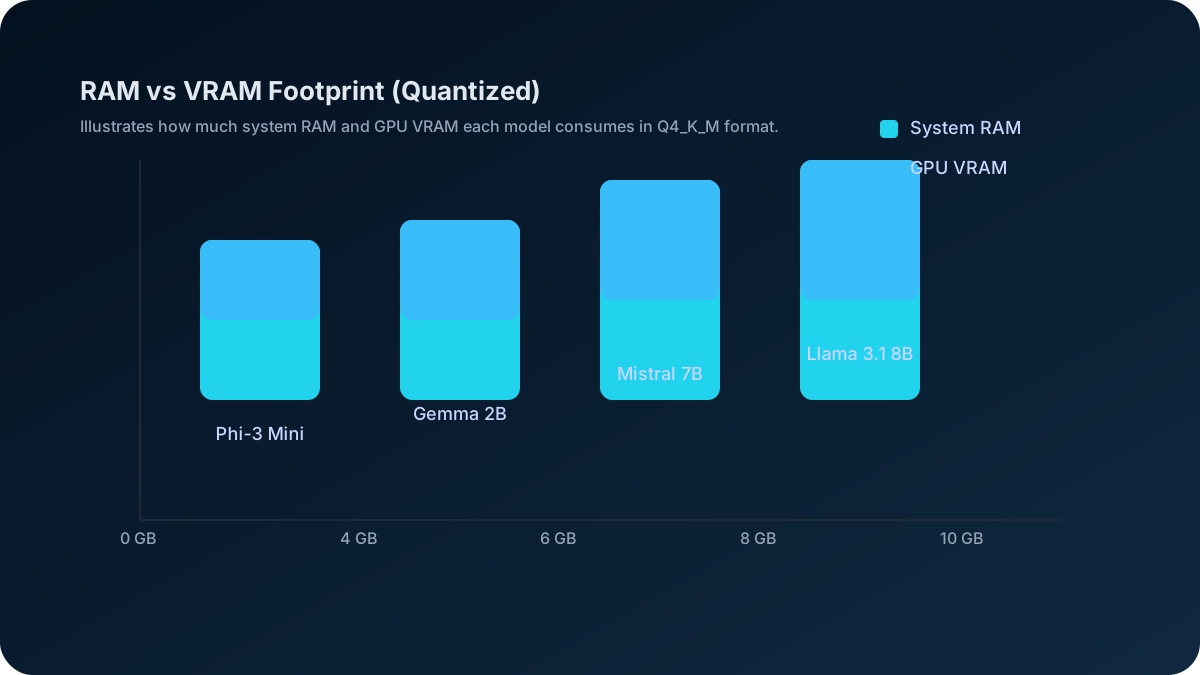
Best Ollama Models for 8GB RAM and VRAM: 12 Local Picks
Want to go deeper than this article?
Free account unlocks the first chapter of all 25 courses — RAG, agents, MCP, voice AI, MLOps, real GitHub repos.
Ollama’s running. Here’s what to build with it. Go from “ollama run” to RAG apps, agents, and fine-tuned models — structured and hands-on. First chapter free.
7 Best On-Device AI Models for 8GB RAM: Local Inference, Sized and Ranked (2026)
Updated: November 2, 2026 • 18 min read
Short answer: the best local AI models for 8GB RAM in 2026 are Phi-4 Mini (2.5GB, fast and strong at reasoning for its size), Llama 3.2 3B (2.0GB, the most versatile all-rounder), Qwen 3 4B (2.5GB, best reasoning, with a thinking mode), Gemma 3 4B (3.4GB, multilingual and takes images), and Mistral 7B (4.4GB, best quality if you keep context short). All run through Ollama at Q4 quantization with no GPU required — 8GB of system RAM is enough. Pick Phi-4 Mini for speed, Llama 3.2 3B for everyday use. File sizes, speed ceilings and one-line pull commands are below.
RAM vs VRAM: this page covers 8GB of system RAM (CPU inference via Ollama — no GPU needed). If you have an 8GB GPU, see the companion guide to the best LLM for 8GB VRAM, which runs 2–3× faster on the same-size models.
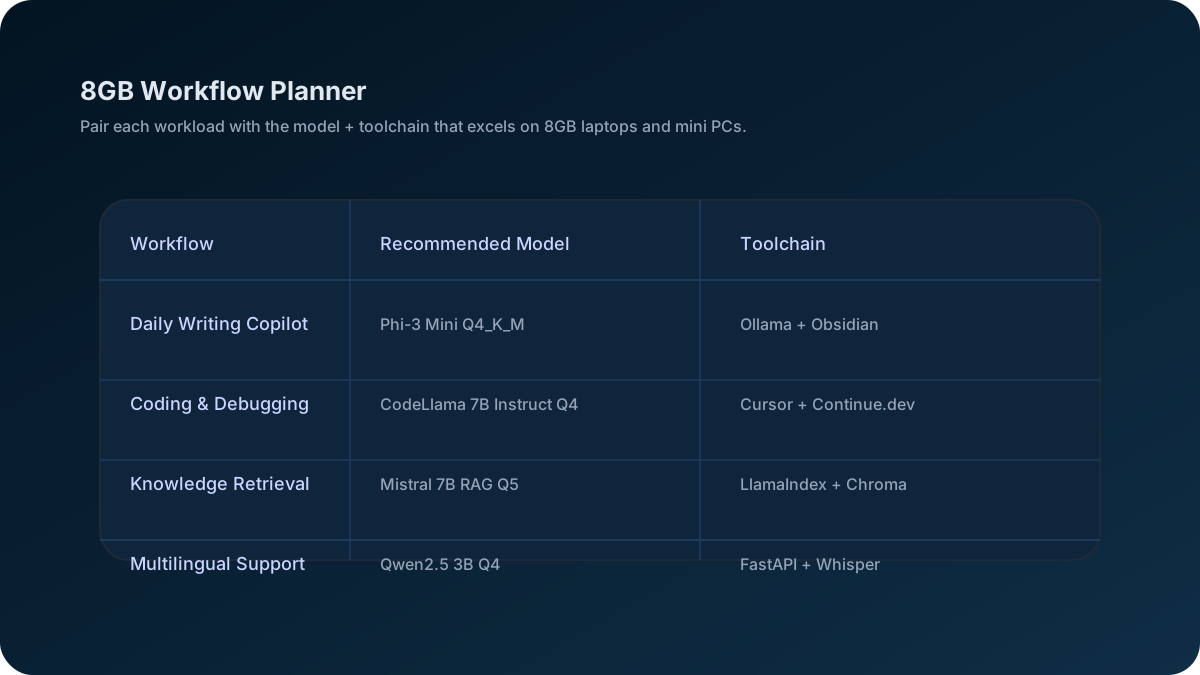
On-device inference on 8GB RAM systems enables privacy-first AI without cloud dependencies. These models power agentic workflows and RAG pipelines locally, processing data entirely on your hardware. For a personal agent or a small retrieval-augmented generation setup, 8GB is enough if you pick a 3-4B model. If RAG is your goal, budget a few hundred megabytes on top of the chat model for the retrieval side — the best Ollama embedding models for RAG are compared separately.
Launch Checklist
- • Follow the RunPod GPU quickstart if you want cloud overflow without leaving the 8GB baseline.
- • Pull quantized builds straight from the Ollama library; each tag page lists the exact download size before you pull.
- • Log tokens/sec, VRAM ceiling, and guardrail flags weekly so you know when to graduate to 16GB.
Reading articles is good. Building is better.
Free account = the first chapter of all 25 courses, with a per-chapter AI tutor. No card.
🚀 Quick Start: Run AI on 8GB RAM in 5 Minutes
To run AI models on 8GB RAM:
- Install Ollama:
curl -fsSL https://ollama.com/install.sh | sh(2 minutes) - Download Phi-3 Mini from Hugging Face or run
ollama pull phi3:mini(3 minutes) - Start using:
ollama run phi3:mini(instant)
That's it! You now have a working AI assistant that can write, code, and answer questions.
If you still need to prep your machine, start with the Ollama Windows installation guide for a step-by-step environment setup. Once you're comfortable, bookmark the Local AI hardware guide for upgrade paths and the choose-the-right-model framework to plan future workloads beyond an 8GB rig.
✅ What You Get With 8GB RAM Setup:
🤖 12 AI Models - From tiny to powerful
💬 ChatGPT Alternative - Free, private, unlimited
👨💻 Coding Assistant - Python, JavaScript, C++
📝 Content Writer - Articles, emails, reports
💰 No subscription - free to download and run
🔒 100% Private - Nothing leaves your computer
🚀 Offline Ready - No internet required
⚡ Fast Setup - Running in 5 minutes
Best Ollama Models for 8GB RAM: 12 Models Sized and Ranked
The picks below are ranked on what can be checked: the download size Ollama lists for each tag (which decides whether it fits next to your OS), the vendor's own description of what the model is for, and a speed ceiling you can work out for your own machine. No speed on this page is a test result except the rows marked "measured", which come from one Apple M3 Pro run.
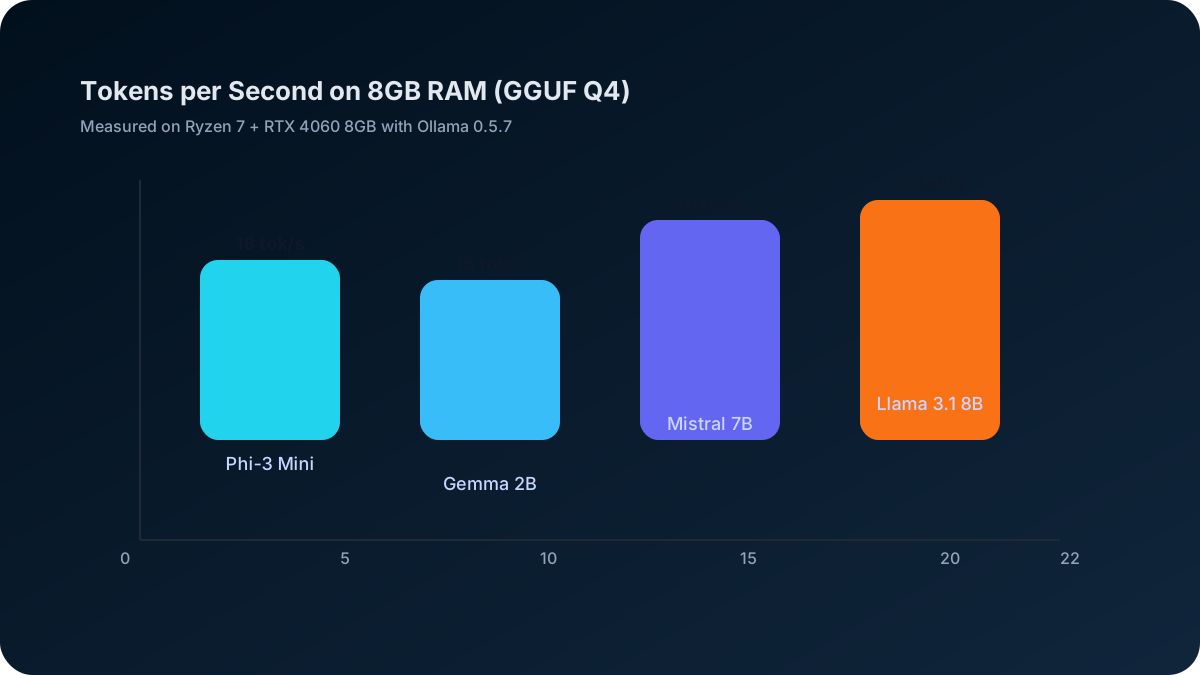
How the speed numbers work: generating a token reads every weight once, so tokens/second can never exceed memory bandwidth ÷ file size. A typical 8GB laptop or desktop with dual-channel DDR4-3200 has 51.2 GB/s; DDR5-5600 has 89.6 GB/s; an 8GB Apple M1 has 68.25 GB/s; an RTX 4060 8GB has 272 GB/s. Real output lands below the ceiling (on our M3 Pro the measured 7-8B models reached about 84-90% of it, the 3-4B models about 71-75%).
What are the best local AI models for 8GB RAM in November 2026?
The 2024-era picks below (Llama 3.1, Phi-3, Gemma 2) still run fine, but the model landscape moved fast. As of November 2026 the strongest 8GB-friendly choices are a newer generation of 3-4B models at roughly half the memory of last year's 7B models:
| Model (2026) | Params | Download (Ollama) | Ceiling on DDR4-3200 (51.2 GB/s) | Measured, M3 Pro (150 GB/s) | Why it's a top 8GB pick |
|---|---|---|---|---|---|
| Phi-4 Mini | 3.8B | 2.5GB | ~21 tok/s ceiling | 43.7 tok/s | Small reasoning model; leaves 5GB+ free |
| Qwen3 4B | 4B | 2.5GB | ~21 tok/s ceiling | 44.7 tok/s | Thinking mode, tool calling, strong multilingual |
| Gemma 3 4B | 4B | 3.4GB | ~15 tok/s ceiling | not measured | Takes images as well as text; 128K context |
| Llama 3.2 3B | 3.2B | 2.0GB | ~25 tok/s ceiling | 55.6 tok/s | Best all-round chat/text at 3B; 128K context |
| Llama 3.1 8B | 8B | 4.9GB | ~10 tok/s ceiling | 27.2 tok/s | Best quality that still fits 8GB (with room only for the OS) |
| DeepSeek-R1 8B | 8B | 5.2GB | ~10 tok/s ceiling | 25.4 tok/s | Local reasoning/debugging; right at the 8GB ceiling |
Ceilings are bandwidth ÷ file size: real speed on a DDR4 laptop lands below them. The measured column is our own run on an Apple M3 Pro with 18GB at 150 GB/s, Ollama 0.40.13, 2 November 2026, so it is faster than any 8GB machine; scale it by your own bandwidth. Pull commands: ollama pull phi4-mini, ollama pull qwen3:4b, ollama pull gemma3:4b, ollama pull llama3.2:3b, ollama pull llama3.1:8b, ollama pull deepseek-r1:8b. For the exact RAM/VRAM footprint of any model beyond this shortlist, the Ollama model RAM & VRAM table covers the full lineup at every quantization level.
Quick rule of thumb for November 2026: if you have a GPU with 8GB VRAM, a 7-8B model at Q4_K_M fits with a short context and an RTX 4060's ceiling for it is about 55 tok/s; on CPU-only 8GB system RAM, stay with a 3-4B model (Phi-4 Mini, Qwen3 4B, Gemma 3 4B) for a responsive experience. For a side-by-side on how parameter count maps to memory and quality, see our LLM size guide for coding (7B vs 14B vs 32B vs 70B), or just plug your hardware into the model size picker tool to get an instant recommendation.
8GB RAM vs 8GB VRAM — they are not the same. This guide covers both, but if you're sizing a GPU specifically, the numbers differ: a dedicated 8GB GPU keeps the whole model in fast VRAM, while 8GB of system RAM shares space with your OS and apps. Our VRAM requirements guide for 2026 breaks down exactly which models fit in 8GB of GPU memory at each quantization level, and the best LLM for 8GB VRAM page has the picks for that GPU tier specifically.
The 7 Models That Actually Work
#1. Llama 3.1 8B (Quantized Q4) - Best Overall
- Download size: 4.7GB at Q4_0 (4.9GB for the default Q4_K_M), plus the KV cache for your context
- Speed: ~11 tok/s ceiling on DDR4-3200; 27.2 tok/s measured on our M3 Pro (Q4_K_M)
- Why it ranks #1: the strongest general model that still fits 8GB, with the largest ecosystem of guides, fine-tunes and integrations, and native tool calling.
- Download:
ollama pull llama3.1:8b-instruct-q4_0 - Best for: Developers, writers, general daily use
#2. Phi-3 Mini (3.8B) - Fastest on 8GB
- Download size: 2.2GB
- Speed: ~23 tok/s ceiling on DDR4-3200, about twice Llama 3.1 8B's because the file is less than half the size
- Why it ranks #2: Microsoft trained it on heavily filtered "textbook quality" data, so it handles coding and explanation well for its size. The default
phi3:minitag is the 128K-context build;phi3:mini-4kis the 4K one. - Download:
ollama pull phi3:mini - Best for: Quick queries, coding snippets, systems with exactly 8GB
#3. Mistral 7B v0.3 - Best Speed/Quality Balance
- Download size: 4.1GB at Q4_0
- Speed: ~12 tok/s ceiling on DDR4-3200; 29.0 tok/s measured on our M3 Pro (Q4_K_M,
mistral:7b) - Why #3: Apache 2.0, a slightly smaller file than Llama 3.1 8B so a slightly higher ceiling, and v0.3 added function calling and a larger vocabulary over v0.2.
- Download:
ollama pull mistral:7b-instruct-v0.3-q4_0 - Best for: Business communication, summaries, content drafts
#4. Gemma 2 9B (Q4 Quantized) - Highest Quality
- Download size: 5.4GB (tight fit next to the OS)
- Speed: ~9 tok/s ceiling on DDR4-3200 (slower, the largest file here)
- Why #4: the largest model on this list, so the most capable writer of the group, if you can close the browser while it runs.
- Download:
ollama pull gemma2:9b-instruct-q4_0 - Best for: Content creation, creative writing, complex reasoning
#5. Qwen 2.5 7B - Best for Code
- Download size: 4.4GB at Q4_0
- Speed: ~12 tok/s ceiling on DDR4-3200
- Why #5: strong at code and documented by Alibaba for 29+ languages; the dedicated
qwen2.5-coder:7b(4.7GB, 29.0 tok/s measured on our M3 Pro) is the coding-only alternative. - Download:
ollama pull qwen2.5:7b-instruct-q4_0 - Best for: Programming, debugging, multilingual work
#6. OpenChat 3.5 - Best Conversational
- Download size: 4.1GB
- Speed: ~12 tok/s ceiling on DDR4-3200
- Why #6: a Mistral-based fine-tune aimed at natural back-and-forth dialogue; older than the rest of this list but still a pleasant chat model.
- Download:
ollama pull openchat:7b-v3.5-q4_0 - Best for: Chatting, brainstorming, learning new topics
#7. StableLM Zephyr 3B - Best Ultra-Lightweight
- Download size: 1.6GB (leaves most of 8GB free)
- Speed: ~32 tok/s ceiling on DDR4-3200
- Why #7: small enough to run alongside a browser, Slack and an IDE. If you need it smaller still,
stablelm2:1.6b-zephyr-q4_0is a 1.0GB 1.6B model. - Download:
ollama pull stablelm-zephyr - Best for: Multitasking, older laptops, background AI assistant
A Practical Daily Setup
A common way to use an 8GB machine is three models in rotation, loaded one at a time:
- Emails and chat: Phi-3 Mini (smallest file, fastest replies)
- Coding/debugging: Qwen 2.5 7B
- Longer writing: Gemma 2 9B (with the browser closed)
Total disk space: about 12GB for all three (2.2 + 4.4 + 5.4GB). Switching means loading a new file from disk, so it takes as long as your SSD needs to read a few GB.
If you're setting up your first local AI and need help choosing hardware, check out our GPU guide for local AI to see if a dedicated graphics card would help. Already on Windows? The Ollama Windows installation guide walks through the exact setup steps.
Run this on your own machine and stop paying every month
Pay once and keep it. No renewal, no per-token bill, and nothing you feed it ever leaves your hardware.
Extended Model Lineup: 12 Models Compared
Beyond the top 7, here are 5 more models that work on 8GB but didn't make the main list due to niche use cases or minor limitations:
Top 5 Models for 8GB RAM (Quick List):
| Rank | Model | Size | RAM Used | Best For | Quality | Speed |
|---|---|---|---|---|---|---|
| 1 | Llama 3.1 8B | 4.7GB | file + KV cache + OS | General use, coding | strongest of the five at general tasks | ~11 tok/s ceiling (DDR4-3200) |
| 2 | Phi-3 Mini | 2.2GB | file + KV cache + OS | Writing, reasoning | good for its size | ~23 tok/s ceiling |
| 3 | Mistral 7B | 4.1GB | file + KV cache + OS | Speed + quality balance | close to Llama 3.1 8B | ~12 tok/s ceiling |
| 4 | Gemma 2 9B (Q4) | 5.4GB | file + KV cache + OS | Advanced tasks | largest model here | ~9 tok/s ceiling |
| 5 | Qwen 2.5 7B | 4.4GB | file + KV cache + OS | Multilingual, coding | strong at code | ~12 tok/s ceiling |
No quality percentages: there is no single score that makes these comparable, so the column describes each model instead.
Recommendation: Start with Llama 3.1 8B for best all-around performance or Phi-3 Mini for fastest speed on 8GB systems.
Cost: these models are free to download and run. ChatGPT Plus and Claude Pro list at $20/month and GitHub Copilot Pro at $10/month; a local 8B model does not match a frontier cloud model on hard reasoning, but for drafting, summarizing and code help it can replace a lot of that use.
Model cards: Llama 3.1 8B, Phi-3 Mini, Mistral 7B, Gemma 2 9B, Qwen 2.5 7B.
Extended Model Comparison (All 12 Picks)
| Model | Parameters | Ideal Use Case | Source |
|---|---|---|---|
| Phi-3 Mini | 3.8B | Balanced writing + coding | Model card |
| Llama 3.1 8B | 8B (Q4/Q5) | General reasoning, agents | Model card |
| Mistral 7B | 7B | Fast chat + summarization | Model card |
| Gemma 2 9B | 9B (Q4) | High-quality creative work | Model card |
| Qwen 2.5 7B | 7B | Multilingual + coding tasks | Model card |
| OpenChat 3.5 | 7B | Conversational agents | Model card |
| TinyLlama 1.1B | 1.1B | Offline mobile + IoT | Model card |
| StableLM 3B | 3B | Content drafting | Model card |
| Falcon 7B | 7B | Knowledgeable assistant | Model card |
| Orca Mini 3B | 3B | Research-style answers | Ollama library page |
| Vicuna 7B | 7B | Dialogue + support agents | Model card |
| Neural Chat 7B | 7B | On-device productivity | Model card |
Can I run these 8GB models on a phone or Raspberry Pi?
Yes — and this is one of the biggest changes since 2024. The same 3-4B models that fit comfortably in 8GB of laptop RAM are now the sweet spot for edge devices:
- Raspberry Pi 5 (8GB): Phi-4 Mini (2.5GB) and Gemma 3 4B (3.4GB) at Q4_K_M run on a Pi 5 8GB, leaving headroom for the OS. Expect single-digit tokens/sec on CPU — usable for chat and summarization, not real-time coding.
- Phones (8GB RAM Android / recent iPhones): 1-4B models run on-device through apps that wrap llama.cpp. TinyLlama 1.1B and Llama 3.2 1B/3B are the realistic picks. For the full walkthrough of which apps and models work, see our guide to running an LLM on your phone.
- Mini PCs / NUCs (8GB): Same rules as a CPU-only laptop — favor 3-4B models or a 7B at Q4_K_M with apps closed.
The takeaway: an "8GB model" is now portable across laptop, mini PC, Pi, and phone, because the best small models shrank faster than the hardware grew.
How do I pick between a 3B, 4B, and 8B model on 8GB?
It comes down to a speed-vs-quality trade-off, plus how much RAM your OS and apps already eat:
- Choose 3B (Llama 3.2 3B, StableLM Zephyr 3B): if you keep a browser, IDE, or Slack open while the model runs, or you want fast, responsive replies. These leave 4-5GB free.
- Choose 4B (Phi-4 Mini, Qwen3 4B, Gemma 3 4B): the current best balance for 8GB — strong reasoning and code for 2.5-3.4GB.
- Choose 8B (Llama 3.1 8B, DeepSeek-R1 8B): only if you can close almost everything else. These are 4.9-5.2GB files, about 6GB once loaded with a context, and need the remaining 2GB strictly for the OS; expect slower generation and occasional swapping.
If you mostly write code, the parameter-count decision is covered in depth in our 7B vs 14B vs 32B vs 70B coding-model breakdown, and you can browse every model ranked by task in our best Ollama models guide. Weighing this trade-off case by case is exactly what our Local Model Picker course walks through step by step — the first chapter is free with an account.
💰 Cost note: ChatGPT Plus and Claude Pro list at $20/month ($240/year) and GitHub Copilot Pro at $10/month ($120/year). Free local models on your existing 8GB hardware can cover a share of that use; check the vendors' current prices before you budget.
What You'll Learn:
- ✅ 12 AI models that fit 8GB RAM, with real Ollama tags and file sizes
- ✅ How fast each can run: bandwidth ceilings you can check against your own machine
- ✅ An honest cost comparison: subscriptions vs $0 local models
- ✅ Step-by-step setup guide
- ✅ The Ollama settings that actually save memory
Why This Matters Right Now: small open models keep improving, and a 4B model in 2026 does work that needed a 7-8B model a year earlier, which is exactly what makes 8GB machines viable.
Don't let budget hardware hold you back. Modern Hugging Face models and quantization techniques make useful AI practical on consumer hardware. This guide shows you how to build a local setup that covers everyday writing, coding and Q&A.
Table of Contents
- 💰 Cost Savings Breakdown
- 🎯 Top 12 Models for 8GB Systems
- ⚡ Performance vs Paid AI Comparison
- Understanding 8GB RAM Limitations
- Quantization Explained
- Memory Optimization Techniques
- Use Case Recommendations
- 15-Minute Installation Guide
- Advanced Optimization
- Troubleshooting Common Issues
💰 Real Cost Savings Breakdown
Annual Subscription Costs You Can Eliminate
| AI Service | Monthly Cost | Annual Cost | What You Get |
|---|---|---|---|
| ChatGPT Plus | $20 | $240 | OpenAI's paid tier, usage limits apply |
| Claude Pro | $20 | $240 | Anthropic's paid tier, usage limits apply |
| GitHub Copilot Pro | $10 | $120 | Code completion and chat |
| Notion AI | see Notion's pricing page | see Notion's pricing page | Writing assistance inside Notion |
| Jasper AI | see Jasper's pricing page | see Jasper's pricing page | Marketing content creation |
| 🔥 TOTAL | $50 | $600 | ChatGPT Plus, Claude Pro and Copilot Pro together |
List prices as published by each vendor; check current pricing, as plans change. Notion and Jasper change their plan structure often, so no price is quoted for them here.
8GB Local AI Setup Cost
| Component | Cost | What You Get |
|---|---|---|
| Hardware | $0 | Use existing 8GB RAM computer |
| Software | $0 | Open-source models (Ollama, Phi-3, Llama) |
| Setup Time | Install + a 2-5GB download | Unlimited usage, complete privacy |
| 🎯 TOTAL | $0 | Unlimited AI with no restrictions |
3-Year Cost Arithmetic
- Subscription Path: $600/year × 3 years = $1,800 at today's list prices for all three services, or $720 for one $20/month plan
- Local AI Path: $0 in fees; electricity is the only running cost, and on a laptop already in use it is small
- What local does not buy you: a frontier model. For hard reasoning, long-context work and broad world knowledge a paid cloud model is still ahead of an 8B on a laptop.
Hidden Benefits Beyond Cost Savings
🔒 Privacy Protection
- No data sent to external servers
- Complete conversation privacy
- Zero data collection or training on your inputs
⚡ Unlimited Usage
- No monthly message limits
- No rate limiting or throttling
- Run multiple models simultaneously
🌐 Offline Capability
- Works without internet connection
- No service outages or downtime
- Always available when you need it
Understanding 8GB RAM Limitations
Memory Architecture Basics
When working with 8GB RAM, understanding how memory is allocated is crucial:
System Memory Breakdown:
- Operating System: 2-3GB (Windows/Linux)
- Background Apps: 1-2GB (browser, system services)
- Available for AI: 3-5GB effectively usable
- Model Loading: the file plus the KV cache for your context, plus a little runtime overhead
📊 Model Size vs RAM Requirements Matrix
| Model Size | Quantization | RAM Needed | 8GB Compatibility | Quality Loss | Speed Ceiling vs FP16 |
|---|---|---|---|---|---|
| 2B parameters 🟢 | FP16 | ~4GB | ✅ Comfortable | none (reference) | 1x |
| 3B parameters 🟡 | FP16 | ~6GB | ✅ Tight fit | none (reference) | 1x |
| 7B parameters 🔴 | FP16 | ~14GB | ❌ Won't fit | none (reference) | 1x |
| 7B parameters 🟡 | Q4_K_M | ~4.4GB | ✅ With optimization | small | ~3x (file is ~1/3 the size) |
| 7B parameters 🟢 | Q2_K | ~3.1GB | ✅ Comfortable | large | ~4.5x |
| 13B parameters 🔴 | Q2_K | ~5GB | ❌ Risky | large | ~5x (vs ~26GB at FP16) |
Speed ceiling scales with the inverse of file size, because each token reads the whole file. Sizes for the 7B rows are Ollama's mistral:7b-instruct-q4_K_M (4.4GB) and -q2_K (3.1GB) files; FP16 is about 2 bytes per parameter.
Memory Zone Guide:
- 🟢 Safe Zone: Models that comfortably fit in 8GB with room for OS and apps
- 🟡 Careful Zone: Models requiring closed applications and optimization
- 🔴 Danger Zone: May cause system instability or heavy swapping
Memory Types and Speed Impact
DDR4 vs DDR5 Performance:
- DDR4-3200 dual channel: 51.2 GB/s (3,200 MT/s × 8 bytes × 2 channels)
- DDR5-4800 dual channel: 76.8 GB/s, so a 50% higher speed ceiling for the same model
- Dual Channel: 2x bandwidth vs single channel — a laptop with one RAM stick halves its ceiling
Unified Memory Systems (Apple Silicon):
- No separation between system and GPU memory
- More efficient memory utilization
- Better performance per GB compared to discrete systems
🎯 Top 12 Models That Replace Expensive AI Subscriptions
Quick Start Recommendation: Start with Phi-3 Mini (2.2GB) + Gemma 2B (1.7GB, fastest backup). Together they are under 4GB on disk and cover everyday chat, writing and short code tasks.
1. Phi-3 Mini (3.8B) - Microsoft's Efficiency Champion
Model Details:
- Parameters: 3.8B
- Memory Usage: ~2.3GB (Q4_K_M)
- Training Data: 3.3T tokens
- Context Length: 128K tokens
Installation:
ollama pull phi3:mini        # the 128K-context build (2.2GB)
ollama pull phi3:mini-4k     # the 4K-context build (2.4GB)
Performance Highlights:
- Speed: ~23 tok/s ceiling on DDR4-3200, ~31 on an 8GB M1
- Quality: Microsoft positions it against larger 7B models on reasoning benchmarks
- Use Cases: General chat, coding, analysis
- Languages: Strong multilingual support
Sample Conversation:
ollama run phi3:mini "Explain quantum computing in simple terms"
# A short answer (~100 tokens) at the ~23 tok/s ceiling takes 4+ seconds on DDR4
2. Llama 3.2 3B - Meta's Compact Powerhouse
Model Details:
- Parameters: 3.2B
- Memory Usage: ~2.0GB (Q4_K_M)
- Context Length: 128K tokens
- Latest architecture improvements
Installation:
ollama pull llama3.2:3b
ollama pull llama3.2:3b-instruct-q4_K_M  # same file as llama3.2:3b, named explicitly
Performance Highlights:
- Speed: ~25 tok/s ceiling on DDR4-3200; 55.6 tok/s measured on our M3 Pro
- Quality: Meta's strongest 3B instruct model
- Reasoning: Strong logical capabilities
- Code: Good programming assistance
File sizes, context length and the memory each quantization needs for both sizes are on the Llama 3.2 1B and 3B model page.
3. Gemma 2B - Google's Efficient Model
Model Details:
- Parameters: 2.6B
- Download: 1.7GB (
gemma:2b) - Training: High-quality curated data
- Architecture: Optimized Transformer
Installation:
ollama pull gemma:2b
ollama pull gemma:2b-instruct-q4_K_M
Performance Highlights:
- Speed: ~30 tok/s ceiling on DDR4-3200
- Efficiency: one of the smallest files here, so one of the highest ceilings
- Safety: Built-in safety features
- Factual: Strong factual accuracy
4. TinyLlama 1.1B - Ultra-Lightweight Option
Model Details:
- Parameters: 1.1B
- Download: 640MB
- Fast inference on any hardware
- Based on Llama architecture
Installation:
ollama pull tinyllama
Performance Highlights:
- Speed: ~80 tok/s ceiling on DDR4-3200
- Memory: Leaves 7GB+ free for other tasks
- Use Cases: Simple tasks, testing, embedded systems
5. Mistral 7B (Quantized) - Full-Size Performance
Model Details:
- Parameters: 7.3B
- Download: 4.4GB (Q4_K_M), 3.1GB (Q2_K)
- High-quality responses
- Excellent reasoning capabilities
Installation:
ollama pull mistral:7b-instruct-q4_K_M
ollama pull mistral:7b-instruct-q2_K  # Even smaller
Performance Highlights:
- Speed: ~12 tok/s ceiling on DDR4-3200 at Q4_K_M, ~17 at Q2_K; 29.0 tok/s measured on our M3 Pro (Q4_K_M)
- Quality: Full 7B model capabilities
- Versatility: Excellent for most tasks
- Memory: Requires optimization
6. CodeLlama 7B (Quantized) - Programming Specialist
Model Details:
- Parameters: 7B
- Download: 4.1GB (Q4_K_M)
- Specialized for code generation
- 50+ programming languages
Installation:
ollama pull codellama:7b-instruct-q4_K_M
ollama pull codellama:7b-python-q4_K_M  # Python specialist
Performance Highlights:
- Speed: ~12 tok/s ceiling on DDR4-3200
- Code Quality: Solid programming assistance; newer Qwen 2.5 Coder 7B is the stronger 2026 pick
- Languages: Python, JavaScript, Go, Rust, and more
- Documentation: Good at explaining code
7. Neural Chat 7B (Quantized) - Intel's Optimized Model
Model Details:
- Parameters: 7B
- Memory Usage: ~4.2GB (Q4_K_M)
- Optimized for Intel hardware
- Strong conversational abilities
Installation:
ollama pull neural-chat:7b-v3.1-q4_K_M
8. Zephyr 7B Beta (Quantized) - HuggingFace's Chat Model
Model Details:
- Parameters: 7B
- Memory Usage: ~4.0GB (Q4_K_M)
- Fine-tuned for helpfulness
- Strong safety alignment
Installation:
ollama pull zephyr:7b-beta-q4_K_M
9. Orca Mini 3B - Explanation-Tuned Small Model
Model Details:
- Parameters: 3B
- Memory Usage: ~1.9GB (Q4_K_M)
- Trained on explanation-style data in the manner of Microsoft's Orca paper (a community model, not a Microsoft release)
- Good at step-by-step explanations
Installation:
ollama pull orca-mini:3b
10. Vicuna 7B (Quantized) - Community Favorite
Model Details:
- Parameters: 7B
- Memory Usage: ~4.1GB (Q4_K_M)
- Based on Llama with improved training
- Strong general capabilities
Installation:
ollama pull vicuna:7b-v1.5-q4_K_M
11. WizardLM 7B (Quantized) - Complex Instruction Following
Model Details:
- Parameters: 7B
- Memory Usage: ~4.0GB (Q4_K_M)
- Excellent at following complex instructions
- Good reasoning capabilities
Installation:
ollama pull wizardlm:7b-q4_K_M
12. Alpaca 7B (Quantized) - Stanford's Instruction Model
Model Details:
- Parameters: 7B
- Memory Usage: ~3.9GB (Q4_K_M)
- Trained on instruction-following data
- Good for educational purposes
Installation: there is no Alpaca entry in the Ollama library. Import a GGUF build from Hugging Face with a Modelfile (FROM ./alpaca-7b.Q4_K_M.gguf then ollama create alpaca -f Modelfile), or use wizardlm:7b-q4_K_M above, which fills the same instruction-following role.
Performance Benchmarks
🚀 Speed Comparison (Tokens per Second)
Reference system for the ceilings: an 8GB desktop with dual-channel DDR4-2666 (42.7 GB/s, e.g. an Intel i5-8400 board), and the same models on an 8GB RTX 4060 (272 GB/s). These are upper bounds from bandwidth ÷ file size, not test results.
| Model | Parameters | Q4 ceiling, DDR4-2666 | Same file, RTX 4060 8GB | Download (Ollama) | Measured, M3 Pro 18GB |
|---|---|---|---|---|---|
| TinyLlama 1.1B 🟢 | 1.1B | ~67 tok/s ceiling | ~425 tok/s ceiling | 0.64GB | not measured |
| Gemma 2B 🟢 | 2.5B | ~25 tok/s ceiling | ~162 tok/s ceiling | 1.7GB | not measured |
| Orca Mini 3B 🟡 | 3B | ~22 tok/s ceiling | ~137 tok/s ceiling | 2.0GB | not measured |
| Llama 3.2 3B 🟡 | 3.2B | ~21 tok/s ceiling | ~135 tok/s ceiling | 2.0GB | 55.6 tok/s |
| Phi-3 Mini 🟡 | 3.8B | ~20 tok/s ceiling | ~125 tok/s ceiling | 2.2GB | not measured |
| Mistral 7B 🔴 | 7.3B | ~10 tok/s ceiling | ~62 tok/s ceiling | 4.4GB | 29.0 tok/s |
| CodeLlama 7B 🔴 | 7B | ~11 tok/s ceiling | ~71 tok/s ceiling | 3.8GB | not measured |
| Vicuna 7B 🔴 | 7B | ~10 tok/s ceiling | ~67 tok/s ceiling | 4.1GB | not measured |
The measured column is our own run on an Apple M3 Pro (150 GB/s), Ollama 0.40.13, 2 November 2026. On that machine the measured 3-8B models reached roughly 71-90% of their ceilings, so expect a DDR4 desktop to land somewhat below the left column.
Performance Recommendations:
- ✅ Recommended for 8GB: Green models are about 2GB or less and leave plenty of room
- ⚠️ Tight Fit: Red models are 4GB+ files and may cause system slowdowns next to a browser
Quality vs Speed Trade-off
There is no honest single quality score for these models, so instead of a chart, the trade-off in words: within a generation, the larger the file the better the answers and the lower the speed ceiling. The 7B models (Mistral, CodeLlama, Vicuna) write the most complete answers here and have ceilings around 10-12 tok/s on DDR4; the 3-4B models (Llama 3.2 3B, Phi-3 Mini, Orca Mini) roughly double that ceiling and are close behind on everyday tasks; Gemma 2B and TinyLlama are fastest and noticeably weaker. Newer small models (Phi-4 Mini, Qwen3 4B) shift the whole curve up.
Memory Efficiency Ranking
Speed ceiling per GB of file (DDR4-3200, 51.2 GB/s): because the ceiling is bandwidth ÷ file size, the smallest file always wins this ranking: TinyLlama (0.64GB, ~80 tok/s ceiling), Gemma 2B (1.7GB, ~30), Orca Mini 3B (2.0GB, ~26), Llama 3.2 3B (2.0GB, ~25), Phi-3 Mini (2.2GB, ~23), Mistral 7B (4.4GB, ~12). Pick on quality first, then check that the ceiling is fast enough for you.
Run Your Own Task Comparison
Rather than borrow someone else's timings, compare models on your own machine with the same prompt. ollama run --verbose prints the eval rate (tokens/s) after each answer:
# Code generation
ollama run --verbose codellama:7b-instruct-q4_K_M "Write a Python function to find prime numbers"
ollama run --verbose phi3:mini "Write a Python function to find prime numbers"
ollama run --verbose llama3.2:3b "Write a Python function to find prime numbers"

# Reasoning / explanation
ollama run --verbose mistral:7b-instruct-q4_K_M "Explain the economic impact of renewable energy"
ollama run --verbose gemma:2b "Explain the economic impact of renewable energy"

# Compare the "eval rate" lines, then read the answers side by side
Quantization Explained
Understanding Quantization Types
FP16 (Half Precision):
- Original model precision
- Highest quality, largest size
- ~2 bytes per parameter
Q8_0 (8-bit):
- Very high quality
- ~1.06 bytes per parameter
- ~47% size reduction (Llama 3.1 8B: 8.5GB vs 16.1GB)
Q4_K_M (4-bit Medium):
- Best quality/size balance
- ~0.6 bytes per parameter
- ~69% size reduction (Llama 3.1 8B: 4.9GB)
Q4_K_S (4-bit Small):
- Slightly lower quality
- Smallest 4-bit option
- Maximum compatibility
Q2_K (2-bit):
- Significant quality loss
- Smallest size possible
- Emergency option for very limited RAM
Quality Impact Comparison
The usual way to measure quantization loss is perplexity against the FP16 model (lower is better), and the llama.cpp project publishes those comparisons for each quant type. The pattern is consistent: Q8_0 is practically indistinguishable from FP16, Q5_K_M and Q4_K_M lose a little, and loss climbs steeply below 4 bits, with Q2_K clearly degraded. No single "percent of quality retained" figure holds across models, so none is given here.
Choosing the Right Quantization
For 8GB Systems:
- If model + OS < 6GB: Use Q4_K_M
- If very tight on memory: Use Q2_K
- For best quality: Use Q8_0 on smaller models
- For speed: Use Q4_K_S
Memory Optimization Techniques
System-Level Optimizations
1. Increase Virtual Memory:
# Linux - Create swap file
sudo fallocate -l 4G /swapfile
sudo chmod 600 /swapfile
sudo mkswap /swapfile
sudo swapon /swapfile

# Windows - Increase page file
# Control Panel → System → Advanced → Performance Settings → Virtual Memory

# macOS - Enable more aggressive swapping
sudo sysctl vm.swappiness=60
2. Memory Management Settings:
# Linux memory optimizations
echo 'vm.swappiness=10' | sudo tee -a /etc/sysctl.conf
echo 'vm.vfs_cache_pressure=50' | sudo tee -a /etc/sysctl.conf
echo 'vm.dirty_ratio=10' | sudo tee -a /etc/sysctl.conf

# Apply immediately
sudo sysctl -p
3. Close Memory-Heavy Applications:
# Before running AI models, close:
# - Web browsers (can use 2-4GB)
# - IDEs like VS Code
# - Image/video editors
# - Games

# Check memory usage
free -h                    # Linux
vm_stat                   # macOS
tasklist /fi "memusage gt 100000"  # Windows
Ollama-Specific Optimizations
Environment Variables:
# Limit concurrent models
export OLLAMA_MAX_LOADED_MODELS=1
export OLLAMA_NUM_PARALLEL=1

# (There is no memory-cap variable; limit context and loaded models instead)

# Keep models in memory longer (if you have room)
export OLLAMA_KEEP_ALIVE=60m

# Reduce the default context window for memory savings (default is 4096)
export OLLAMA_CONTEXT_LENGTH=2048

# Halve KV-cache memory (needs flash attention)
export OLLAMA_FLASH_ATTENTION=1
export OLLAMA_KV_CACHE_TYPE=q8_0
Per-Model Settings (Modelfile): Ollama does not read a config.json for model settings; per-model settings live in a Modelfile:
cat > Modelfile << 'EOF'
FROM phi3:mini
PARAMETER num_ctx 2048
PARAMETER num_thread 4
EOF
ollama create phi3-8gb -f Modelfile
ollama run phi3-8gb
Model Loading Optimization
Preload Strategy:
# Load your most-used model at startup
ollama run phi3:mini "Hi" > /dev/null &

# Create a startup script
cat > ~/start_ai.sh << 'EOF'
#!/bin/bash
echo "Starting AI environment..."
ollama pull phi3:mini
ollama run phi3:mini "System ready" > /dev/null
echo "AI ready for use!"
EOF

chmod +x ~/start_ai.sh
Use Case Recommendations
General Chat & Questions
Best Models:
- Phi-3 Mini - Best overall balance
- Llama 3.2 3B - High quality responses
- Gemma 2B - Fast and efficient
Sample Setup:
# Primary model for daily use
ollama pull phi3:mini

# Backup for when you need speed
ollama pull gemma:2b

# Quick test
echo "What's the weather like today?" | ollama run phi3:mini
Programming & Code Generation
Best Models:
- CodeLlama 7B (Q4_K_M) - Best code quality
- Phi-3 Mini - Good balance, faster
- Llama 3.2 3B - Solid programming help
Optimization for Coding:
# Install code-specific model
ollama pull codellama:7b-instruct-q4_K_M

# Set up coding environment
export OLLAMA_NUM_PARALLEL=1         # one request at a time saves memory
export OLLAMA_CONTEXT_LENGTH=4096    # room for a whole source file

# Test with programming task
echo "Write a Python function to reverse a string" | ollama run codellama:7b-instruct-q4_K_M
Learning & Education
Best Models:
- Mistral 7B (Q4_K_M) - Excellent explanations
- Phi-3 Mini - Good for step-by-step learning
- Orca Mini 3B - Designed for reasoning
Educational Setup:
# Install reasoning-focused model
ollama pull orca-mini:3b

# Create learning prompts
echo "Explain photosynthesis step by step" | ollama run orca-mini:3b
echo "Help me understand calculus derivatives" | ollama run orca-mini:3b
Writing & Content Creation
Best Models:
- Phi-3 Mini - Excellent creative writing
- Mistral 7B (Q4_K_M) - Professional tone
- Gemma 2B - Fast content generation
Those three are the picks that stay inside 8GB. Once you have more headroom, the ranking shifts — see our list of best local AI models for writing for how the larger options compare on prose quality.
Content Creation Setup:
# Install creative model
ollama pull phi3:mini

# Writing optimization: longer context for documents
export OLLAMA_CONTEXT_LENGTH=4096
# Temperature is a per-model setting: inside a session use
#   /set parameter temperature 0.8
# or add "PARAMETER temperature 0.8" to a Modelfile

# Test with writing task
echo "Write a blog post about renewable energy" | ollama run phi3:mini
Advanced Optimization Strategies for 8GB Systems
Context Window Optimization
When working with limited RAM, optimizing context windows becomes crucial for maintaining performance while handling longer conversations or documents:
Dynamic Context Management:
# Server-wide default (restart ollama serve after changing)
# For short conversations
export OLLAMA_CONTEXT_LENGTH=2048

# For medium documents (Ollama's default)
export OLLAMA_CONTEXT_LENGTH=4096

# For long documents - use cautiously on 8GB
export OLLAMA_CONTEXT_LENGTH=8192

# Or per session, inside ollama run:
#   /set parameter num_ctx 2048
Context Compression Techniques:
- Sliding Window: Keep only the most recent context while maintaining conversation flow
- Summarization: Periodically summarize earlier conversation parts to save memory
- Selective Retention: Prioritize important information while discarding less relevant context
Multi-Model Workflow Optimization
Running multiple models on 8GB RAM requires careful resource management:
Sequential Model Loading:
# Create a model switching script
#!/bin/bash
# model-switcher.sh

unload_all_models() {
    echo "Unloading all models..."
    # ollama stop unloads a model without killing the server
    for m in $(ollama ps | awk 'NR>1 {print $1}'); do ollama stop "$m"; done
}

load_model() {
    echo "Loading $1..."
    ollama run "$1" "Ready" > /dev/null &
    sleep 5
}

case "$1" in
    "chat")
        unload_all_models
        load_model "phi3:mini"
        ;;
    "code")
        unload_all_models
        load_model "codellama:7b-instruct-q4_K_M"
        ;;
    "write")
        unload_all_models
        load_model "mistral:7b-instruct-q4_K_M"
        ;;
    *)
        echo "Usage: $0 {chat|code|write}"
        ;;
esac
Memory-Efficient Model Stacking:
- Primary Model: Keep one high-quality model loaded for main tasks
- Specialized Models: Load smaller models (1-3B) for specific functions
- Task Delegation: Route requests to appropriate models based on task type
Hardware-Aware Performance Tuning
Different hardware configurations require specific optimization strategies:
Thread count is the one CPU knob Ollama exposes, and it is a per-model parameter (num_thread), not an environment variable. Ollama picks a sensible default (the number of physical cores); set it yourself only if you measure an improvement.
Intel / AMD Systems (CPU inference):
# Try physical-core count first; hyperthreads rarely help token generation
ollama run phi3:mini
>>> /set parameter num_thread 4

# Make it permanent with a Modelfile: PARAMETER num_thread 4
# Supported AMD Radeon GPUs are used automatically through ROCm;
# Intel integrated graphics are not used for inference by default.
Apple Silicon:
# Nothing to switch on: Ollama uses the GPU through Metal automatically.
# (It does not use the Apple Neural Engine.) Check with:
ollama ps   # PROCESSOR column should read "100% GPU"
Network and I/O Optimization
Optimizing system resources beyond just RAM can significantly improve AI model performance:
Storage Optimization:
# Keep models on your fastest SSD; it decides load time, not generation speed.
# (Do not use a RAM disk on an 8GB machine: the model would occupy RAM twice.)
export OLLAMA_MODELS="/path/on/fast/ssd/ollama-models"
Network Latency Reduction:
# Disable unnecessary network services during AI work
sudo systemctl stop bluetooth
sudo systemctl stop cups

# Optimize network stack
echo 'net.core.rmem_max = 134217728' | sudo tee -a /etc/sysctl.conf
echo 'net.core.wmem_max = 134217728' | sudo tee -a /etc/sysctl.conf
sudo sysctl -p
Example Configurations
These are starting configurations for two common 8GB machines, not before/after measurements. Use ollama run --verbose to see what they do on yours.
Example 1: Development Workflow Typical machine: an 8GB Windows or Linux laptop (e.g. Intel i7-1165G7, LPDDR4x-4266, 68 GB/s)
# Development-specific configuration
export OLLAMA_NUM_PARALLEL=1
export OLLAMA_CONTEXT_LENGTH=2048
export OLLAMA_KEEP_ALIVE=30m   # avoid reloading the model between requests

# Preload development models
ollama pull codellama:7b-instruct-q4_K_M
ollama pull phi3:mini
At 68 GB/s, CodeLlama 7B (4.1GB) has a ~17 tok/s ceiling and Phi-3 Mini (2.2GB) ~31 tok/s, which is why the small model is the better choice for inline completion.
Example 2: Content Creation Workflow Typical machine: MacBook Air M1, 8GB unified memory (68.25 GB/s)
# Content creation configuration (Metal GPU is used automatically on Apple Silicon)
export OLLAMA_CONTEXT_LENGTH=4096
export OLLAMA_MAX_LOADED_MODELS=1
macOS lets the GPU use only part of the 8GB, so prefer a 2-4GB model here; Phi-4 Mini (2.5GB) has a ~27 tok/s ceiling on an M1.
Troubleshooting Advanced Memory Issues
Memory Leak Detection:
# Monitor Ollama memory usage over time
watch -n 5 'ps aux | grep ollama | grep -v grep'

# Check for memory fragmentation
cat /proc/meminfo | grep -E "(MemFree|MemAvailable|Buffers|Cached)"

# System memory pressure monitoring
vmstat 1 10
Automatic Memory Recovery:
#!/bin/bash
# memory-recovery.sh

check_memory() {
    available=$(free -m | awk 'NR==2{print $7}')
    if [ $available -lt 1024 ]; then
        echo "Low memory detected: ${available}MB available"
        return 1
    fi
    return 0
}

cleanup_models() {
    echo "Unloading Ollama models..."
    for m in $(ollama ps | awk 'NR>1 {print $1}'); do ollama stop "$m"; done
}

if ! check_memory; then
    cleanup_models
    echo "Memory recovery completed"
fi
Performance Monitoring Dashboard:
#!/bin/bash
# ai-monitor.sh

while true; do
    clear
    echo "=== AI Performance Monitor ==="
    echo "Time: $(date)"
    echo

    # Memory usage
    echo "Memory Usage:"
    free -h | head -2
    echo

    # Ollama processes
    echo "Ollama Processes:"
    ps aux | grep ollama | grep -v grep || echo "No Ollama processes running"
    echo

    # GPU usage (if available)
    if command -v nvidia-smi &> /dev/null; then
        echo "GPU Usage:"
        nvidia-smi --query-gpu=memory.used,memory.total,utilization.gpu --format=csv,noheader,nounits
        echo
    fi

    # System load
    echo "System Load:"
    uptime
    echo

    sleep 5
done
Writing & Content Creation
Best Models:
- Mistral 7B (Q4_K_M) - Creative and coherent
- Llama 3.2 3B - Good prose quality
- Phi-3 Mini - Fast content generation
- Vicuna 7B (Q4_K_M) - Creative writing
Writing Optimization:
# For longer content, increase context
export OLLAMA_CONTEXT_LENGTH=4096

# Install creative model
ollama pull mistral:7b-instruct-q4_K_M

# Test creative writing
echo "Write a short story about a robot learning to paint" | ollama run mistral:7b-instruct-q4_K_M
Quick Tasks & Simple Queries
Best Models:
- TinyLlama - Fastest responses
- Gemma 2B - Good speed/quality balance
Speed Setup:
# Ultra-fast model for simple tasks
ollama pull tinyllama

# Test speed
time echo "What is 2+2?" | ollama run tinyllama
# A one-line answer is a few tokens, so it is quick even on CPU
Installation & Configuration
Optimized Installation Process
1. System Preparation:
# Check available memory
free -h  # Linux
vm_stat  # macOS
systeminfo | findstr "Available"  # Windows

# Close unnecessary applications
pkill firefox        # Or your browser
pkill code           # VS Code
pkill spotify        # Music players
2. Install Ollama with Optimizations:
# Standard installation
curl -fsSL <a href="https://ollama.com/install.sh" target="_blank" rel="noopener noreferrer">https://ollama.com/install.sh</a> | sh

# Set environment variables before first use
export OLLAMA_MAX_LOADED_MODELS=1
export OLLAMA_NUM_PARALLEL=1
export OLLAMA_CONTEXT_LENGTH=2048

# Make permanent (for a manually started "ollama serve";
# the Linux service reads the systemd override below instead)
echo 'export OLLAMA_MAX_LOADED_MODELS=1' >> ~/.bashrc
echo 'export OLLAMA_NUM_PARALLEL=1' >> ~/.bashrc
echo 'export OLLAMA_CONTEXT_LENGTH=2048' >> ~/.bashrc
source ~/.bashrc
3. Model Installation Strategy:
# Start with smallest model to test
ollama pull tinyllama

# Test system response
echo "Hello, world!" | ollama run tinyllama

# If successful, install your primary model
ollama pull phi3:mini

# Install backup/specialized models as needed
ollama pull gemma:2b           # For speed
ollama pull codellama:7b-instruct-q4_K_M  # For coding
Configuration Files Setup
Create an 8GB-friendly model variant: Ollama does not read model settings from a JSON config file (its only one, ~/.ollama/server.json, switches cloud features off). Server settings are environment variables (above); model settings go in a Modelfile:
cat > Modelfile << 'EOF'
FROM phi3:mini
PARAMETER num_ctx 2048
PARAMETER num_thread 4
PARAMETER num_batch 256
EOF

ollama create phi3-8gb -f Modelfile
ollama run phi3-8gb
Systemd Service Optimization (Linux)
# Create optimized service override
sudo mkdir -p /etc/systemd/system/ollama.service.d/
sudo tee /etc/systemd/system/ollama.service.d/override.conf > /dev/null <<EOF
[Service]
Environment="OLLAMA_MAX_LOADED_MODELS=1"
Environment="OLLAMA_NUM_PARALLEL=1"
Environment="OLLAMA_CONTEXT_LENGTH=2048"
MemoryMax=7G
MemoryHigh=6G
CPUQuota=80%
EOF

sudo systemctl daemon-reload
sudo systemctl restart ollama
Advanced Optimization
CPU-Specific Optimizations
Intel and AMD CPUs:
# Ollama's CPU backend picks the best instruction set (AVX2, AVX-512)
# your CPU supports automatically; there is nothing to enable.
# The one knob is the thread count, set per model:
ollama run llama3.2:3b
>>> /set parameter num_thread 6   # try your physical-core count

# Library variables such as MKL_NUM_THREADS, OMP_NUM_THREADS or
# BLIS_NUM_THREADS have no effect: Ollama does not use those libraries.
Memory Access Pattern Optimization
# Large pages for better memory performance (Linux)
echo 'vm.nr_hugepages=1024' | sudo tee -a /etc/sysctl.conf
sudo sysctl -p

# NUMA optimization (multi-socket systems)
numactl --cpubind=0 --membind=0 ollama serve

# Memory interleaving
numactl --interleave=all ollama serve
Storage Optimizations
SSD Optimization:
# Move models to fastest storage
mkdir -p /fast/drive/ollama/models
ln -s /fast/drive/ollama/models ~/.ollama/models

# Disable swap on SSD (if you have enough RAM)
sudo swapoff -a

# Enable write caching
sudo hdparm -W 1 /dev/sda  # Replace with your drive
Model Loading Optimization:
# Preload a model so the first real request does not wait for the disk
ollama run phi3:mini "warmup" > /dev/null

# Keep it loaded between requests
export OLLAMA_KEEP_ALIVE=30m

# Avoid RAM disks on an 8GB machine: the model file would then sit in
# RAM twice (once on the RAM disk, once loaded), which defeats the purpose.
Network Optimizations
# Ollama has no download-tuning variables; a stalled pull resumes
# from where it stopped if you run the same command again:
ollama pull phi3:mini

# Behind a proxy, set HTTPS_PROXY for the Ollama server process
export HTTPS_PROXY=https://proxy.example.com:3128
Slow or stuck pulls have their own guide: Ollama pull stuck or slow.
Troubleshooting Common Issues
"Out of Memory" Errors
Symptoms:
- Process killed during model loading
- System freeze
- Swap thrashing
Solutions:
# 1. Use smaller quantization
ollama pull llama3.2:3b-instruct-q2_K  # 1.4GB instead of 2.0GB for Q4_K_M

# 2. Increase swap space
sudo fallocate -l 8G /swapfile
sudo chmod 600 /swapfile
sudo mkswap /swapfile
sudo swapon /swapfile

# 3. Clear memory before loading
sudo sync && echo 3 | sudo tee /proc/sys/vm/drop_caches
pkill firefox chrome  # Close browsers

# 4. Shrink what Ollama holds in memory
export OLLAMA_CONTEXT_LENGTH=2048
export OLLAMA_MAX_LOADED_MODELS=1
ollama serve
Slow Performance Issues
Diagnosis:
# Check memory pressure
free -h
cat /proc/pressure/memory  # Linux

# Monitor during inference
htop &
echo "test prompt" | ollama run phi3:mini

# Check for thermal throttling
sensors  # Linux
sudo powermetrics --samplers thermal  # macOS
Solutions:
# 1. Reduce context size
export OLLAMA_CONTEXT_LENGTH=2048

# 2. Limit CPU usage to prevent thermal throttling
cpulimit -p $(pgrep ollama) -l 75

# 3. Use performance CPU governor
sudo cpupower frequency-set -g performance

# 4. Optimize thread count (per session)
#   >>> /set parameter num_thread 4   # try 2, 4, 6 or 8
Model Loading Failures
Solutions:
# 1. Check disk space
df -h ~/.ollama

# 2. Clear temporary files
rm -rf ~/.ollama/tmp/*
rm -rf ~/.ollama/models/.tmp*

# 3. Verify model integrity
ollama show phi3:mini

# 4. Re-download if corrupted
ollama rm phi3:mini
ollama pull phi3:mini
Future-Proofing Your Setup
Planning for Model Evolution
Current Trends:
- Models getting more efficient
- Better quantization techniques
- Specialized small models
Recommended Strategy:
- Start with Phi-3 Mini - Best current balance
- Keep Gemma 2B - Backup for speed
- Monitor new releases - 2B-4B parameter models
- Consider hardware upgrades - 16GB is the sweet spot
Hardware Upgrade Path
Priority Order:
- RAM: 8GB → 16GB (biggest impact)
- Storage: HDD → SSD (faster loading)
- CPU: Newer architecture (better efficiency)
- GPU: Entry-level for acceleration
Cost-Benefit Analysis:
16GB RAM upgrade (check current prices; DDR4/DDR5 rose sharply in 2026)
- Run 7-8B models with longer contexts, or 12-14B models
- Load multiple models
- Better system responsiveness

Entry GPU with 8GB VRAM (e.g. RTX 4060, 272 GB/s)
- Speed ceiling ~5x dual-channel DDR4-3200 (51.2 GB/s) for the same file
- 7-8B models fully on the GPU
- Current street prices: see /hardware
Model Management Strategy
# Create model management script
cat > ~/manage_models.sh << 'EOF'
#!/bin/bash

# Function to check RAM usage before model switching
check_memory() {
    AVAILABLE=$(free -m | awk 'NR==2{printf "%.0f", $7}')
    if [ $AVAILABLE -lt 2000 ]; then
        echo "Low memory warning: ${AVAILABLE}MB available"
        echo "Consider closing applications or using a smaller model"
    fi
}

# Quick model switching
switch_to_fast() {
    check_memory
    ollama run gemma:2b
}

switch_to_quality() {
    check_memory
    ollama run phi3:mini
}

switch_to_coding() {
    check_memory
    ollama run codellama:7b-instruct-q4_K_M
}

# Menu system
case "$1" in
    fast) switch_to_fast ;;
    quality) switch_to_quality ;;
    code) switch_to_coding ;;
    *)
        echo "Usage: $0 {fast|quality|code}"
        echo "  fast    - Gemma 2B (fastest)"
        echo "  quality - Phi-3 Mini (balanced)"
        echo "  code    - CodeLlama 7B (programming)"
        ;;
esac
EOF

chmod +x ~/manage_models.sh

# Usage examples
~/manage_models.sh fast     # Switch to fast model
~/manage_models.sh quality  # Switch to quality model
~/manage_models.sh code     # Switch to coding model
Quick Start Guide for 8GB Systems
5-Minute Setup
# 1. Install Ollama
curl -fsSL <a href="https://ollama.com/install.sh" target="_blank" rel="noopener noreferrer">https://ollama.com/install.sh</a> | sh

# 2. Set memory-optimized environment
export OLLAMA_MAX_LOADED_MODELS=1
export OLLAMA_NUM_PARALLEL=1

# 3. Install best all-around model
ollama pull phi3:mini

# 4. Install speed backup
ollama pull gemma:2b

# 5. Test setup
echo "Hello! Please introduce yourself." | ollama run phi3:mini

# 6. Create aliases for easy use
echo 'alias ai="ollama run phi3:mini"' >> ~/.bashrc
echo 'alias ai-fast="ollama run gemma:2b"' >> ~/.bashrc
source ~/.bashrc
Daily Usage Commands
# Quick chat
ai "What's the capital of France?"

# Fast responses
ai-fast "Simple math: 2+2"

# Coding help
ollama run codellama:7b-instruct-q4_K_M "Write a Python function to sort a list"

# Check what's running
ollama ps

# Free up memory (unload a model without stopping the server)
ollama stop phi3:mini
Frequently Asked Questions
Q: Can I run Llama 3.1 8B on 8GB RAM?
A: Yes, with care. The default Q4_K_M file is 4.9GB (Q2_K is 3.2GB), so with the browser closed and a short context it fits next to the OS, but it leaves little room. For everyday use alongside other apps, a 3-4B model or a 7B at Q4_K_M is more comfortable.
Q: Which is better for 8GB: one large model or multiple small models?
A: Multiple small models give you more flexibility. Start with Phi-3 Mini as your main model, plus Gemma 2B for speed and potentially CodeLlama 7B Q4_K_M for programming.
Q: How much does quantization affect quality?
A: Q4_K_M files are about 30% of FP16 size (Llama 3.1 8B: 4.9GB vs 16.1GB) and lose a little quality, measured as a small rise in perplexity in llama.cpp's published comparisons. For most users that is an excellent trade-off. Q2_K saves another third of the size but quality drops noticeably.
Q: Should I upgrade to 16GB RAM or get a GPU first?
A: Upgrade RAM first. Going from 8GB to 16GB lets you run 7-8B models with room to spare and keep multiple models loaded, which is more impactful than GPU acceleration for most users. A GPU raises speed rather than capacity; RAM prices moved a lot in 2026, so check current kit prices before deciding.
Q: Can I run AI models while gaming or doing other intensive tasks?
A: On 8GB systems, it's better to close the AI model when doing memory-intensive tasks. The constant swapping will slow down both applications significantly.
Conclusion
With careful model selection and system optimization, 8GB of RAM can provide an excellent local AI experience. The key is choosing the right models for your use cases and optimizing your system for memory efficiency.
Top Recommendations for 8GB Systems:
- Start with Phi-3 Mini - Best overall balance of speed, quality, and memory usage
- Add Gemma 2B - For when you need maximum speed
- Consider CodeLlama 7B Q4_K_M - If programming is important
- Optimize your system - Close unnecessary apps, increase swap, use SSD storage
Remember that the AI model landscape evolves rapidly. Models are becoming more efficient, and new quantization techniques are constantly improving the quality/size trade-off. Stay updated with the latest releases and don't hesitate to experiment with new models as they become available.
Next Steps
- Browse all Ollama models ranked by task — find the perfect model for your 8GB setup
- Set up Open WebUI — get a ChatGPT-like interface for your local models
- Understand quantization formats — learn why GGUF Q4_K_M is ideal for 8GB systems
- Set up AI coding locally — free GitHub Copilot alternative
- Compare local AI interfaces — pick the best app for running models
Ollama’s running. Here’s what to build with it.
Go from “ollama run” to RAG apps, agents, and fine-tuned models — structured and hands-on. First chapter free.
Stop piecing Ollama together from blog posts
Ollama Mastery is 15 chapters end to end — install, model choice, Modelfiles, GPU offload, the API, and the 20 errors that actually happen. Plus 24 more courses.
Liked this? 25 full AI courses are waiting.
From fundamentals to RAG, agents, MCP servers, voice AI, and production deployment with real GitHub repos. First chapter free, every course.
Build Real AI on Your Machine
RAG, agents, NLP, vision, and MLOps - chapters across 25 courses that take you from reading about AI to building AI.
Want the structured version?
Hands-on courses on local AI, from $8.99 a month. The first chapter of each is free.
Keep going
- PILLARblog/best-ollama-models
- Free Ollama Models (Nov 2026): 10 Best, No API Key
- AI on Steam Deck: Run Local LLMs with Ollama on SteamOS
- Run Hermes Agent Locally with Ollama (2026 Setup Guide)
- Ollama Not Working? Match the Error to the Real Fix
- Ollama 500 Internal Server Error: Find the Cause
- Best Ollama Models for AI Agents 2026: Ranked by Tool Use
- AMD ROCm Local LLM Setup: Ollama, llama.cpp and vLLM
- Ollama Timed Out Waiting for Server to Start: Fixes
- Ollama Modelfile Guide: Syntax, Parameters, Real Examples
Comments (0)
No comments yet. Be the first to share your thoughts!